The Challenges of Traditional App Design
In the fast-paced world of mobile app development, time is of the essence. Developers and designers are often caught in a cycle of lengthy design processes that can drain resources and stifle creativity. Traditional app design methods can be time-consuming, requiring extensive knowledge of design tools and principles. This often leads to frustration, especially for those who may not have formal design training. Additionally, hiring professional designers can come with substantial costs, making it a challenging prospect for startups and smaller companies.
This is where Appthetics comes in, offering a solution that not only saves time but also reduces costs while maintaining a high standard of quality. By harnessing the power of artificial intelligence, Appthetics transforms your app ideas into stunning designs in just seconds, allowing you to focus on what really matters—building your app.
What is Appthetics?
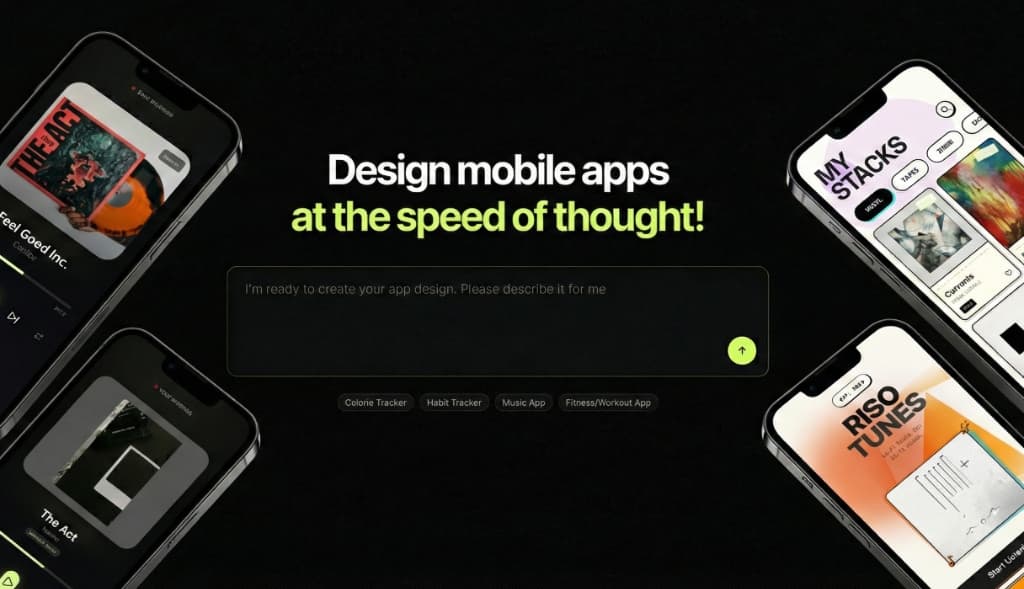
Appthetics is an AI-powered mobile app UI/UX design tool that streamlines the app design process. With a simple text prompt, users can generate high-fidelity screens tailored to their specific descriptions. This innovative platform eliminates the need for extensive design skills, enabling anyone—regardless of their design background—to create professional-grade app interfaces.
The core function of Appthetics is its AI design generation capability. Users describe their app idea in a few sentences, and the AI interprets this input to produce visually appealing and functional design screens. From there, users can edit every detail of the design, export production-ready code, and even create App Store screenshots effortlessly. Appthetics offers a seamless integration of design generation and editing features, making it a comprehensive solution for app developers.
The Problem Appthetics Solves
For many developers, the app design process is fraught with hurdles. Traditional methods often involve complex software that can take months to master. Furthermore, the costs associated with hiring skilled designers can be prohibitive. This creates a gap where many talented developers struggle to bring their app visions to life without incurring heavy expenses or dedicating countless hours to learning design skills.
Appthetics addresses these pain points by providing a tool that is both affordable and easy to use. Users can bypass the traditional learning curve associated with design software and instead focus on their app’s functionality and user experience. The platform is particularly beneficial for startups and independent developers who need to maximize their resources while still producing quality designs.
How Appthetics Works
Using Appthetics is straightforward and user-friendly. Here’s a step-by-step breakdown of the typical workflow:
- Describe Your Idea: Enter a simple text prompt that describes the mobile app you want to create. The more specific you can be, the better the results.
- AI Generates UI: The AI processes your description and instantly creates professional, high-fidelity screens that reflect your idea.
- Edit Designs: Use the point-and-click editing feature to modify any aspects of the design, including text, colors, and images, ensuring it meets your vision.
- Export Code: Once you’re satisfied with the design, you can export it as production-ready code, making it easy to integrate into your project.
- Create App Store Screenshots: Appthetics also allows you to create stunning App Store screenshots, complete with device frames and customizable backgrounds, ready for submission.
- Iterate and Improve: With real-time editing capabilities, you can continually refine your designs based on user feedback or evolving ideas.
- Export to Figma: If you need additional editing, you can easily export your designs to Figma, where your team can further polish the layouts.
This streamlined process not only saves time but also significantly reduces the complexity often associated with app design. You can try it yourself at Appthetics.
Key Features of Appthetics
- AI Design Generation: Generate high-fidelity designs from simple text prompts, reducing the need for traditional design skills.
- Real-Time Editing: Modify designs instantly with point-and-click editing for a customizable user experience.
- Export Options: Export designs as production-ready code or directly to Figma for further enhancements.
- App Store Screenshot Maker: Create professional App Store screenshots, complete with device frames and customizable backgrounds.
- Editable Designs: Every generated screen is fully editable, allowing for fine-tuning and adjustments.
These features empower developers to create visually appealing apps without the extensive time investment typically required. The ability to generate designs quickly while maintaining a high level of quality is a game changer, particularly for teams under tight deadlines or with limited resources. Appthetics offers a unique value proposition that sets it apart from traditional design methods.
Who Appthetics is For
Appthetics is designed for a diverse range of users, primarily targeting:
- App Developers: Individuals or teams looking to create high-quality mobile app designs quickly and affordably.
- Startup Founders: Entrepreneurs who may not have extensive design skills but need to create compelling app prototypes for investors or early adopters.
- Freelance Designers: Professionals looking to speed up their design workflow and expand their offerings without the need for extensive design tools.
- Product Managers: Individuals responsible for overseeing app development who need to provide quick design solutions to their teams without getting bogged down in technical details.
By streamlining the design process, Appthetics allows these users to focus on their core competencies—whether that’s coding, business strategy, or user engagement—while still producing high-quality designs.
Appthetics vs Alternatives
When comparing Appthetics to alternatives like Figma, Adobe XD, and Sketch, a few key differences emerge. While Figma is known for its collaborative design features and robust prototyping capabilities, it requires a significant investment of time to learn its interface and design principles. On the other hand, Adobe XD offers powerful design tools but can also be overwhelming for those without design experience.
Appthetics stands out due to its AI-driven design generation, allowing users to produce high-fidelity designs almost instantly. This speed and ease of use make it a more accessible option for those without formal design training. Unlike traditional tools, which often require extensive customization and manual adjustments, Appthetics simplifies the process significantly, making it suitable for anyone looking to create app designs quickly.
While Figma excels in collaborative environments and offers features for design systems, Appthetics prioritizes speed and simplicity, making it an excellent choice for individuals or small teams. Ultimately, the choice between these tools will depend on individual needs; however, Appthetics provides a compelling argument for those who want to get designs done efficiently.
Real-World Use Cases
- Startup App Development: A startup founder can quickly turn their app idea into a prototype using Appthetics, generating high-fidelity designs in minutes rather than weeks—perfect for pitching to investors.
- Freelance Designer Projects: Freelance designers can utilize Appthetics to streamline their workflow, allowing them to take on more projects without sacrificing quality, all while maintaining a competitive edge.
- App Store Optimization: An app developer can create eye-catching App Store screenshots with custom backgrounds and device frames, significantly improving their app’s visibility and attractiveness to potential users.
- User Testing and Feedback: A product manager can quickly generate multiple design iterations and gather user feedback, allowing for rapid prototyping and adjustments based on real user input.
- Educational Purposes: Instructors teaching app development can use Appthetics to demonstrate design principles and processes, providing students with a hands-on tool that simplifies complex concepts.
Getting Started with Appthetics
Ready to transform your app design process? Getting started with Appthetics is simple. Visit Appthetics to sign up for an account and begin creating stunning mobile app designs today. With a user-friendly interface and powerful AI capabilities, you’ll be able to turn your app ideas into reality in no time.
FAQ
How does the AI design generation work?
The AI design generation works by interpreting your text prompt and creating tailored UI screens based on your description. The more specific your input, the better the generated designs.
Can I export the designs?
Yes, you can export designs as production-ready code or directly to Figma for further editing and iteration.
What is included in the subscription?
The subscription includes editable designs, real-time design generation, code exports, and the ability to create App Store screenshots.
Can I cancel my subscription anytime?
Yes, you can cancel your subscription at any time without any penalties.
Do you offer refunds?
Refund policies may vary, so it’s best to check the specific terms on the Appthetics website for details regarding refunds.
Can I use Appthetics for collaborative projects?
While Appthetics is primarily designed for individual use, exported designs can be easily shared with team members for collaborative editing in Figma or other design tools.
Bottom Line
Appthetics is a powerful tool that redefines the app design process, making it accessible to anyone, regardless of their design experience. By harnessing AI technology, Appthetics not only saves time but also reduces costs, allowing users to focus on building their apps with confidence. If you’re tired of the traditional design grind and are looking for a quick, affordable solution, look no further than Appthetics. Embrace the future of app design and start creating today!