Introduction: The Challenge of Managing Tasks on Mac
In today's fast-paced work environment, productivity tools are essential for managing tasks efficiently. Many Mac users find themselves overwhelmed by the constant need to switch between various applications—be it notes, task lists, or focus timers. This constant window switching not only disrupts concentration but also fragments your workflow, making it challenging to stay organized.
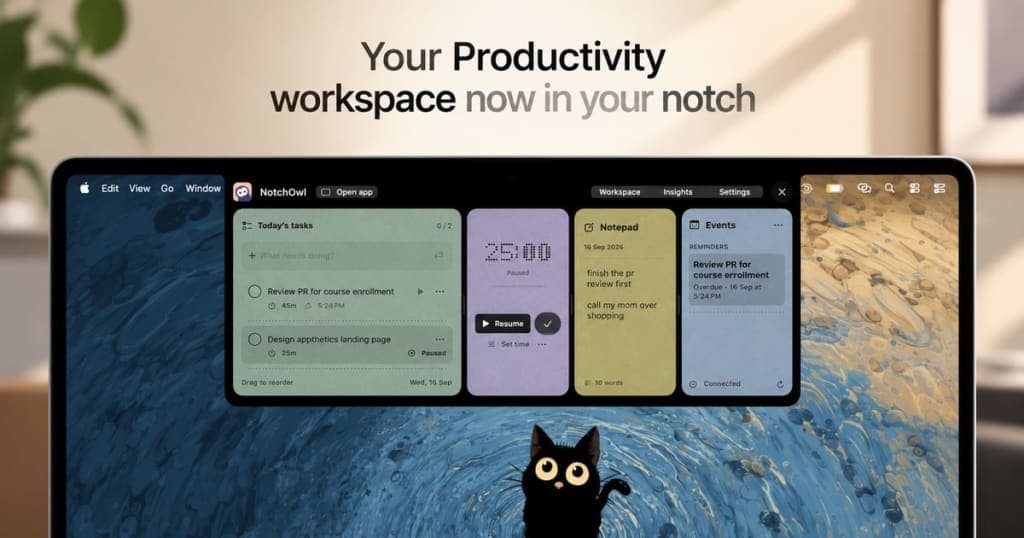
This is where NotchOwl comes in. Designed specifically for Mac users, NotchOwl leverages the often-overlooked notch feature of your device to create a centralized workspace. By integrating tasks, notes, focus timers, and calendar events into a single accessible space at the top of your screen, NotchOwl aims to simplify your workflow and enhance your productivity.
Imagine having everything you need at your fingertips, without the hassle of toggling between applications. With NotchOwl, that vision becomes a reality. This blog post will delve deep into what NotchOwl is, the problems it solves, how it operates, its key features, and much more.
What is NotchOwl?
NotchOwl is an innovative productivity application designed for Mac users, specifically targeting the unique capabilities of Macs featuring a notch. It combines multiple productivity functions into one cohesive interface. Here’s a breakdown of its primary features:
- Task Management: Easily create and manage tasks without switching applications.
- Notes App: A built-in notepad allows you to jot down quick notes that can be easily converted into tasks.
- Focus Timer: Set focus sessions using a customizable timer to enhance concentration and productivity.
- Calendar Integration: View upcoming events from your Apple Calendar without leaving the app.
- Insights Feature: Track your productivity with visual insights into completed tasks and focus time.
NotchOwl is not just another productivity tool; it is a solution that offers a distinct approach by utilizing the space around your Mac’s notch. By centralizing your day-to-day tasks, it allows you to maintain focus and organization with ease.
The Problem NotchOwl Solves
Many Mac users struggle with productivity due to the myriad of applications available for task management, note-taking, and time tracking. Switching between these tools can be a significant distraction. Here are a few common pain points that NotchOwl addresses:
- Fragmented Workflow: Users often find themselves juggling multiple apps for different tasks, leading to a disjointed workflow.
- Lack of Focus: Constantly switching windows can break concentration, making it hard to complete tasks efficiently.
- Inefficient Time Management: Without a clear view of tasks and deadlines, managing time effectively becomes a challenge.
NotchOwl provides a unified solution to these issues by centralizing essential productivity features. It allows you to focus on one task at a time, enhancing your overall productivity.
How NotchOwl Works
Getting started with NotchOwl is simple and intuitive. Here’s a step-by-step guide to help you integrate it into your daily workflow:
- Download and Install: Visit NotchOwl to download the application. The installation process is straightforward, requiring just a few clicks.
- Open NotchOwl: Once installed, you can access NotchOwl by hovering over the notch or pressing Option-N.
- Create Tasks: Quickly create tasks by typing them directly into the task manager. You can also convert notes into tasks using Command-Return.
- Set Focus Sessions: Choose how long you want to focus on a task and start the timer. The timer will remain visible while you work on your task.
- Take Notes: Use the notepad to jot down ideas or reminders. These notes are saved automatically for easy access later.
- Track Your Progress: Utilize the insights feature to visualize your productivity. Check completed tasks and focus time to understand your daily activity better.
- Calendar Integration: Optionally connect your Apple Calendar to see upcoming events, allowing for better time management.
By following these steps, you can seamlessly incorporate NotchOwl into your existing workflow, making it a valuable tool for enhancing productivity.
Key Features of NotchOwl
NotchOwl offers several compelling features that set it apart from traditional productivity tools:
- Task Management: Manage all your tasks in one place without needing to switch between different applications.
- Focus Timer: A customizable focus timer that helps you work on tasks without distractions, allowing you to achieve more in less time.
- Instant Note-Taking: Capture thoughts and ideas instantly with the built-in notepad, which automatically saves your entries.
- Seamless Calendar Integration: View your upcoming schedule directly from the app, ensuring you never miss important deadlines.
- Insights and Analytics: Gain valuable insights into your productivity patterns through visual representations of your completed tasks and focus sessions.
Contextualizing the Features
The combination of these features allows for a streamlined user experience. For example, while working on a report, you can jot down ideas directly in the NotchOwl notepad. If you need to switch to a different task, simply create a new task in the app and set a focus timer to keep you on track. This eliminates the need to open multiple tabs or applications, saving you precious time.
Moreover, the insights feature can help you identify when you are most productive, allowing you to adjust your work habits accordingly. For instance, if you notice that you complete tasks more efficiently in the morning, you can schedule your most demanding work during that time.
Who NotchOwl is For
NotchOwl is designed for Mac users who are looking to enhance their productivity. Here are some concrete personas that would benefit from this application:
- Freelancers and Remote Workers: Individuals who manage multiple tasks and projects can utilize NotchOwl to keep everything organized without the need for constant window switching.
- Students: With the ability to take quick notes and manage assignments, students can stay on top of their coursework while maintaining focus during study sessions.
- Professionals in Fast-Paced Environments: Those who work in high-stress environments can benefit from the focus timer feature, allowing them to tackle tasks methodically without distractions.
By addressing the specific needs of these user groups, NotchOwl provides a tailored productivity solution that enhances workflow efficiency and focus.
NotchOwl vs Alternatives
When comparing NotchOwl to its competitors, such as Todoist, Trello, and Evernote, several key differences emerge:
- Pricing Structure: NotchOwl operates on a one-time purchase model, costing $4.90 for lifetime access, whereas competitors like Todoist often require ongoing subscriptions. This makes NotchOwl a more cost-effective choice for long-term users.
- User Experience: NotchOwl's unique integration with the Mac's notch allows it to provide a dedicated workspace that is both accessible and unobtrusive. In contrast, many competitors require users to switch between different windows, which can fragment focus.
- Feature Set: While Todoist and Evernote offer robust task management and note-taking capabilities, they do not have the dedicated focus timer and insights features that NotchOwl provides. This makes NotchOwl particularly appealing for users who prioritize focus and productivity.
- Target Audience: NotchOwl specifically targets Mac users, leveraging the notch feature, while competitors often cater to a broader audience across multiple platforms.
In conclusion, while alternatives like Todoist and Trello provide valuable tools, NotchOwl's unique features and pricing structure make it an attractive option for Mac users looking for a streamlined productivity experience.
Real-World Use Cases
Here are some specific scenarios demonstrating how users can leverage NotchOwl effectively:
- Freelance Project Management: A freelancer can create a new task for each client project, set focus sessions to complete each task, and use the notepad to jot down client requests or ideas during meetings.
- Student Study Sessions: A student preparing for exams can set a focus timer for each subject, jot down important notes, and review insights to see how much time they spend on each topic.
- Remote Team Collaboration: A remote worker can keep track of tasks assigned by their manager, set focus times for project deadlines, and use the calendar integration to stay aligned with team meetings.
- Daily Planning: Users can start their day by reviewing their tasks, setting a focus timer for the most important item, and jotting down quick notes for ideas that arise during the day.
- Brainstorming Ideas: During a brainstorming session, users can quickly capture ideas in the notepad, converting them into actionable tasks as they refine their concepts.
These use cases illustrate the versatility of NotchOwl, catering to various needs across different user types.
Getting Started with NotchOwl
If you're ready to enhance your productivity with NotchOwl, getting started is easy. Simply head over to NotchOwl to purchase and download the application. The one-time payment grants you lifetime access to all features, updates, and the ability to use it on up to three Macs. Plus, with a 14-day money-back guarantee, you can try it risk-free.
Once you’ve downloaded the app, follow the previously outlined steps to integrate it into your daily workflow. You’ll quickly discover how NotchOwl can transform your productivity approach, keeping your tasks and notes organized while minimizing distractions.
FAQ
How does NotchOwl fit into my day?
NotchOwl integrates into your workflow by providing easy access to tasks and notes at the top of your screen. You can hover over the notch or press Option-N to open your workspace.
Can I choose my own focus duration?
Yes, you can set a custom focus duration for your tasks, allowing you to tailor your work sessions to your preferences.
Can I turn a note into a task?
Absolutely, just press Command–Return to convert a note into a task, making task management seamless and intuitive.
Do I need a Mac with a notch?
No, NotchOwl is designed to work on displays without a notch as well. It opens at the top center of the screen, below the menu bar.
How does the insights feature work?
The insights feature helps you visualize your completed tasks and focus time, giving you a clearer picture of your productivity patterns.
What if I want to deactivate my license on one Mac?
You can deactivate your license in the NotchOwl settings, allowing you to transfer the license to another Mac easily.
Bottom Line
In a world where productivity is paramount, NotchOwl offers a unique solution tailored specifically for Mac users. By transforming your Mac's notch into a dedicated productivity workspace, it combines tasks, notes, focus timers, and calendar events into one accessible space, reducing distractions and enhancing focus. With its one-time purchase model, NotchOwl not only saves you money but also provides a lifetime of updates and support. If you’re looking to streamline your workflow and boost your productivity, it's time to give NotchOwl a try. Visit NotchOwl today to get started!