The Challenges of Collaborative AI Development
In today's fast-paced tech environment, teams are increasingly reliant on artificial intelligence (AI) to enhance productivity and streamline processes. However, one significant challenge many teams encounter is effectively managing AI prompts and agent skills. These essential components often end up scattered across various platforms—be it Google Docs, Slack threads, or personal notebooks. This fragmentation leads to confusion over which version is the most current, potential loss of valuable insights, and difficulty in tracking changes over time.
Imagine a scenario where a team of AI engineers is working on refining a chatbot's responses. Team members might draft prompts in different locations, making it nearly impossible to guarantee that everyone is working from the latest version. When one member implements a change, it might overwrite someone else's work, or worse, revert to an outdated prompt without anyone realizing it. This disorganized approach not only hampers collaboration but also risks the integrity of the AI's performance in production.
This is where SkyLab enters the scene. Designed specifically to address the needs of teams working with AI, SkyLab provides a centralized workspace that streamlines the entire process of creating, sharing, and managing AI prompts and skills. By fostering collaboration among both technical and non-technical team members, SkyLab ensures that everyone can contribute effectively and that all changes are tracked and managed efficiently.
What is SkyLab?
SkyLab is a comprehensive platform tailored for teams looking to build, share, version, and deploy AI prompts and agent skills collaboratively. Unlike traditional methods that often leave prompts stored in disparate locations, SkyLab consolidates all your team's prompts into one single, organized workspace. It facilitates seamless collaboration among team members, allowing them to draft, review, and refine AI prompts efficiently.
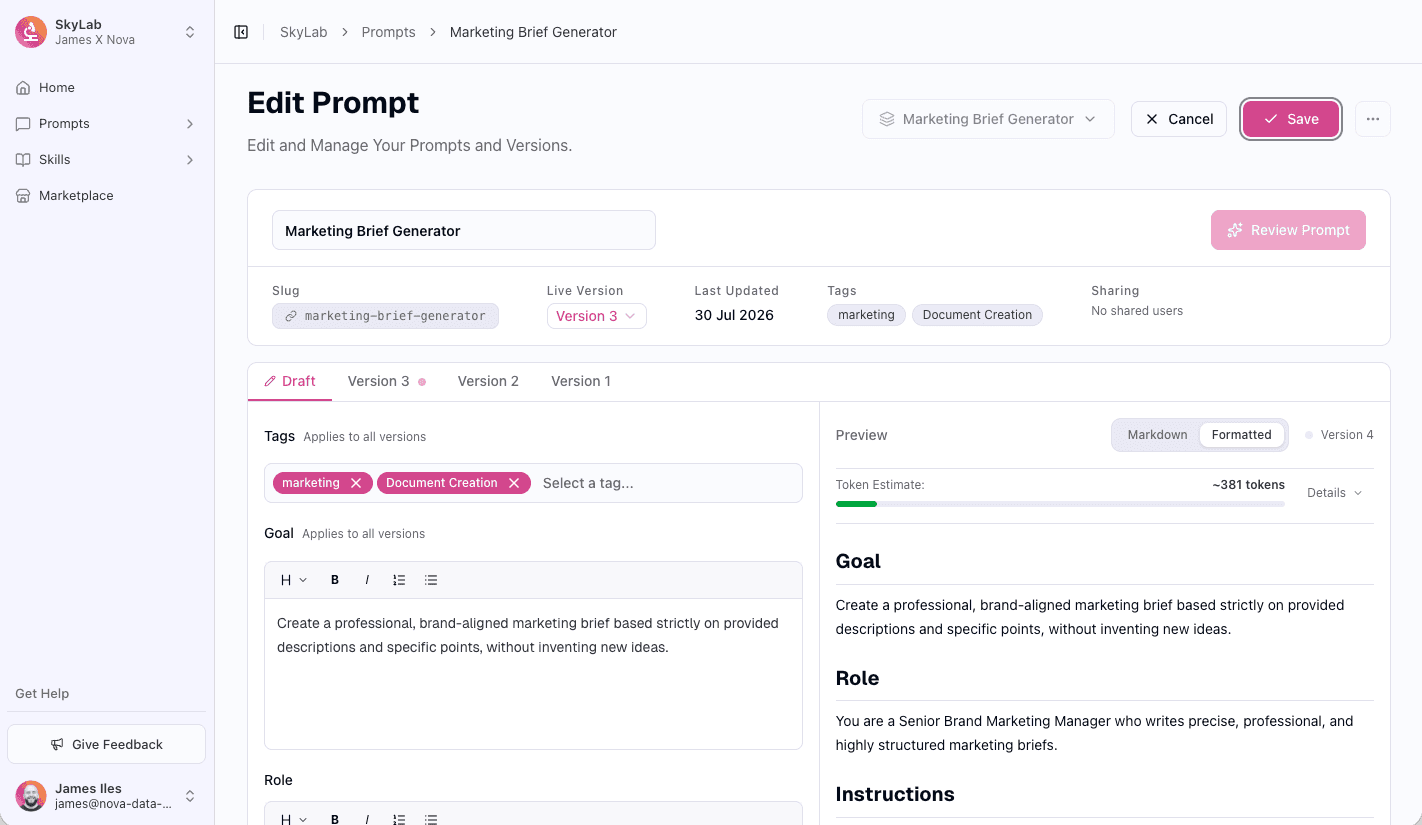
At its core, SkyLab operates as a structured editor, where users can create and manage prompts and skills in a user-friendly environment. The tool integrates an AI-assisted authoring feature that guides users through the process of developing prompts from a simple job description into a fully structured format. This not only saves time but also reduces errors in prompt design.
Additionally, SkyLab incorporates version control that tracks every edit made to a prompt or skill. This feature allows teams to compare different versions side by side, ensuring that everyone is aware of the latest changes and can revert to previous versions if necessary. Consequently, this leads to more reliable outputs in production, as teams can maintain a clear history of modifications made over time.
The Problem SkyLab Solves
For many organizations, the process of developing AI prompts and skills lacks the structure necessary for effective collaboration. Teams often resort to copying prompts between various documents and chat platforms, leading to confusion over which version is the most reliable. The absence of a centralized system for managing these elements results in lost improvements and regression issues when outputs in production fail to meet expectations.
Consider a product team that is tasked with enhancing a virtual assistant's capabilities. Each member might have their own ideas for prompts, but without a centralized platform, they risk duplicating efforts or, worse, overwriting each other’s contributions. When something goes wrong in production—such as the assistant misinterpreting user queries—there's no straightforward way to determine what changed or why it happened.
SkyLab addresses these issues by providing a dedicated workspace where prompts and skills can be created, reviewed, and managed collectively. With a focus on collaboration, it allows both technical and non-technical team members to work together efficiently. This means that everyone can contribute to the development process without the fear of losing track of changes or having their work overwritten.
How SkyLab Works
Using SkyLab is straightforward and designed to cater to both seasoned AI developers and newcomers alike. Here’s a step-by-step overview of a typical workflow:
- Create a New Prompt or Skill: Start by using the AI-assisted wizard that guides users from a plain description to a complete structured prompt or SKILL.md file.
- Collaborate with Team Members: Invite team members to review and edit the prompt. Each contribution is tracked, ensuring transparency.
- Version Control: As changes are made, SkyLab automatically saves versions, allowing users to compare and select the most current version easily.
- AI-Powered Review: Utilize the on-demand analysis feature to receive feedback on the strengths and gaps of the prompt, ensuring quality outputs.
- Promote to Live: Once the team is satisfied with the edits, they can promote the version they trust to live status, making it available for use in applications.
- Reference via API: Teams can integrate the live version of their prompt into their applications or agents by using the provided API, SDK, or MCP access.
- Marketplace Exploration: Explore the marketplace for ready-made skills that can be forked into your workspace, allowing teams to build on existing work while maintaining links to original sources.
By following these steps, teams can create a reliable workflow that enhances collaboration and minimizes the chaos often associated with managing AI prompts and skills. For more information on how to optimize your team’s AI efforts, check out SkyLab.
Key Features of SkyLab
SkyLab boasts a variety of features that facilitate effective collaboration, version control, and prompt management:
- AI-Assisted Authoring: A guided wizard helps transform basic job descriptions into structured prompts or SKILL.md files, making it easier for teams to create effective prompts.
- Version Control: Every edit is tracked, allowing users to compare versions side by side and maintain a single, reliable version per prompt or skill.
- AI-Powered Review: On-demand analysis identifies strengths and gaps in prompts, providing teams with a revised draft ready for acceptance.
- Skills with Files: Each skill can include scripts and reference files, enabling comprehensive context and support for AI functionalities.
- Marketplace: Access a marketplace of ready-made skills that can be forked into your workspace while staying updated with upstream changes.
- Token Estimation: Estimate token usage across various AI models, including OpenAI, Anthropic, and Google, to manage resource allocation effectively.
- API, SDK, and MCP Access: Integrate live versions directly into applications, ensuring that the most recent updates are always in use.
These features collectively create a robust environment for teams to manage AI prompts and skills effectively. For instance, the AI-powered review tool significantly reduces the time spent on quality assurance, helping teams focus on innovation rather than repetitive tasks.
Who SkyLab is For
SkyLab is designed for a diverse range of users involved in AI development, particularly:
- AI Engineers: Those responsible for creating and refining AI models will benefit from a structured environment where they can easily draft and manage prompts.
- Product Managers: Individuals overseeing AI projects can utilize SkyLab to ensure that their teams are aligned and working from the latest versions of prompts and skills.
- Prompt Reviewers and QA Teams: These users can leverage the AI-powered review tool to streamline the quality assurance process, ensuring that all prompts meet the necessary standards before going live.
- Cross-Functional Teams: SkyLab encourages collaboration between technical and non-technical members, making it suitable for diverse teams that require input from various expertise areas.
By targeting these personas, SkyLab effectively addresses the challenges faced by organizations at different stages of AI adoption. Whether you're a seasoned AI developer or a product manager looking to enhance team collaboration, SkyLab provides the tools necessary to streamline your workflow.
SkyLab vs Alternatives
When evaluating SkyLab, it’s essential to consider how it stacks up against alternatives in the market. Here’s a brief comparison with some competitors:
- PromptBase: While PromptBase offers a marketplace for buying and selling prompts, it lacks the collaborative features that SkyLab provides. For teams needing a structured workspace to develop prompts collectively, SkyLab is the superior choice.
- Notion: Many teams use Notion to manage documentation, including AI prompts. However, Notion does not offer version control specific to AI prompts or the AI-assisted authoring features that SkyLab provides, making it less optimal for AI-focused environments.
- GitHub: GitHub offers version control for code but is not tailored specifically for AI prompts and skills. While it can be used to manage prompts, it lacks the user-friendly interface and AI review features that SkyLab provides.
- Google Docs: Although Google Docs allows for collaborative editing, it does not offer the versioning and review features specific to AI prompt management that are critical for maintaining quality in AI outputs.
Overall, each alternative has its strengths, but SkyLab’s unique combination of features—such as AI-assisted authoring, dedicated version control for prompts, and a collaborative marketplace—make it a powerful tool for teams looking to enhance their AI capabilities. For a closer look at how SkyLab can transform your workflow, visit SkyLab.
Real-World Use Cases
- Customer Support Enhancement: A customer support team uses SkyLab to develop and iterate prompts for their virtual assistant. With multiple team members contributing, they ensure that the assistant's responses are accurate and helpful, reducing response times and improving customer satisfaction.
- Marketing Campaigns: A marketing team utilizes SkyLab to create prompts for generating social media content. By collaborating in real-time, they can ensure that all posts align with the brand voice and messaging strategy, while also tracking changes to maintain consistency.
- Research and Development: An R&D team uses SkyLab to manage prompts for a new AI-driven product. The ability to review and refine prompts through AI-powered analysis helps them identify gaps in their approach, leading to more innovative solutions.
- Education and Training: An educational organization employs SkyLab to develop prompts for an AI tutoring platform. By collaborating with educators and content creators, they create tailored prompts that enhance the learning experience for students.
- Product Development: A product development team leverages SkyLab to refine prompts for their AI-driven product features. With version control, they can track changes made over time, ensuring that any improvements are documented and accessible for future reference.
These real-world applications demonstrate how SkyLab can enhance collaboration, streamline workflows, and ultimately improve the quality of AI outputs across various industries.
Getting Started with SkyLab
Starting with SkyLab is easy. You can sign up for a free trial that allows you to explore all the features without any upfront cost. To get started, head over to SkyLab and create your account today. Once registered, you can invite your team members to join, set up your workspace, and begin managing your AI prompts and skills collaboratively.
The user-friendly interface and AI-assisted features will guide you through the process of developing effective prompts, ensuring that your team maximizes productivity from day one.
FAQ
How does version control work in SkyLab?
SkyLab tracks every change made to prompts and skills, allowing users to view a complete history of edits. This enables teams to compare versions side by side and select the most reliable one for production.
Can non-technical users utilize SkyLab?
Absolutely. SkyLab is designed to accommodate both technical and non-technical team members. The AI-assisted authoring feature helps guide users through the prompt creation process, making it accessible for everyone.
What types of files can be managed within SkyLab?
Users can manage prompts, SKILL.md files, scripts, and reference files all in one place. This holistic approach ensures that teams have everything they need to develop and deploy AI skills effectively.
Is there a marketplace for ready-made skills?
Yes, SkyLab features a marketplace where users can explore and fork ready-made skills into their own workspace. This allows teams to build on existing work while staying updated with any upstream changes.
How can I integrate SkyLab with my applications?
SkyLab provides API, SDK, and MCP access, allowing teams to pull live versions of prompts directly into their applications. This ensures that the most recent and reliable versions are always in use.
What types of teams benefit most from using SkyLab?
SkyLab is beneficial for AI engineers, product managers, prompt reviewers, and any cross-functional teams working on AI development. It fosters collaboration and ensures that everyone can contribute effectively.
Bottom Line
SkyLab addresses the critical pain points associated with managing AI prompts and agent skills by offering a centralized workspace that promotes collaboration and efficient workflow. With features such as AI-assisted authoring, version control, and a marketplace for ready-made skills, teams can enhance their productivity and ensure the quality of their AI outputs.
If your team is ready to take AI development to the next level, SkyLab offers the tools you need to collaborate effectively and manage prompts and skills seamlessly. Start your free trial today and experience the difference for yourself!