The Challenge of Effective Learning
In today's fast-paced educational environment, students, researchers, and professionals face a significant challenge: how to efficiently process the vast amounts of information available from various sources. From YouTube lectures and PDFs to audio presentations and academic papers, the volume of content can be overwhelming. Many learners find themselves spending hours watching videos or reading documents, only to struggle with retention and organization of the material. This often leads to frustration, as notes become scattered across different platforms, making it difficult to revisit and study effectively.
This is where Notelify comes in. Notelify is an AI-powered study workspace designed to streamline the learning process. By transforming unstructured content into organized study materials, it helps users save time and enhance their learning efficiency. Whether you're preparing for exams or conducting research, Notelify offers a solution that integrates all your study resources in one place.
What is Notelify?
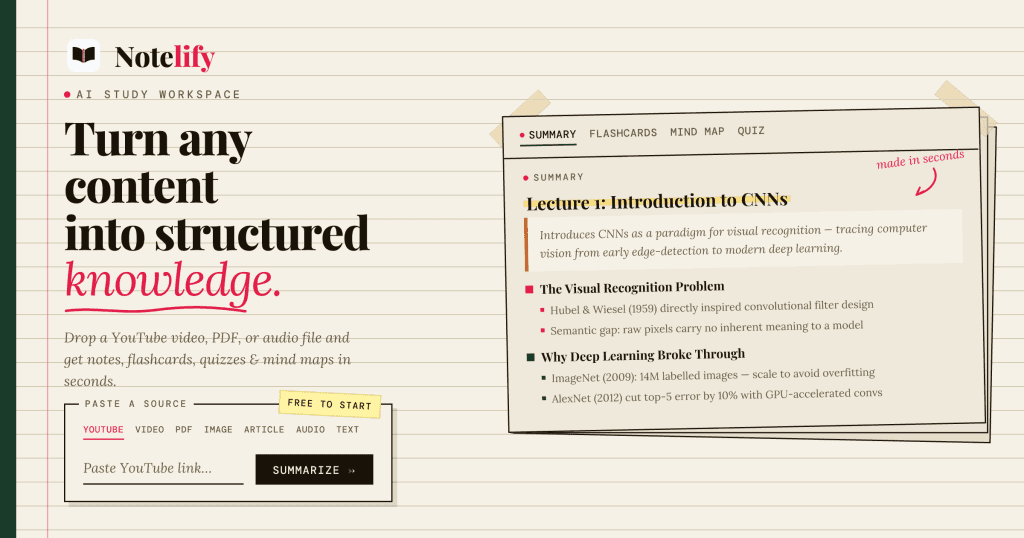
Notelify is a comprehensive AI study workspace that enables users to convert various types of content—such as YouTube videos, PDFs, audio recordings, and images—into structured study materials like notes, flashcards, quizzes, and mind maps. The platform is tailored for students, researchers, and professionals looking to optimize their study processes and improve retention.
The core functionality of Notelify revolves around its ability to analyze and distill complex information into manageable formats. Users can upload content directly or paste URLs, and within minutes, Notelify generates useful learning resources. This not only saves time but also allows users to focus on understanding the material rather than merely consuming it.
The Problem Notelify Solves
Consider the common frustrations faced by students and professionals alike: hours spent watching lectures or reading papers, only to end up with disorganized notes that are difficult to navigate. Many learners have experienced the pain of trying to locate specific information within a sea of scattered notes or resources. They may find themselves rewatching videos or rereading texts, which can be a tedious process that detracts from actual learning.
Notelify addresses this issue by providing a centralized workspace where all study materials are organized and easily accessible. Users no longer have to worry about losing important notes or struggling to remember key concepts. Instead, they can focus on what truly matters—the learning itself. This significant reduction in time spent on organization and information retrieval allows for a more effective study experience.
How Notelify Works
Using Notelify is straightforward and user-friendly. Here’s a step-by-step guide on how to get started:
- Upload or Paste Your Content: Users can either upload files (like PDFs or images) directly or paste links to online content, such as YouTube videos. For instance, if you're preparing for an exam, you might paste a link to a relevant lecture.
- AI Content Analysis: Once the content is submitted, Notelify's AI processes the material, extracting key points, summarizing concepts, and organizing information into structured formats.
- Receive Organized Study Materials: After processing, Notelify generates a suite of study aids, including notes, flashcards, quizzes, and mind maps. This happens in under a minute, allowing for quick access to vital information.
- Engage with Your Learning: Users can interact with their materials by reviewing notes, quizzing themselves with flashcards, or using the AI Tutor feature to ask questions about the content.
- Export or Share: Finally, users can export their notes as clear PDFs or share their study workspace with others, facilitating collaboration and discussion.
This intuitive process enables students to transition from passive consumption of material to active engagement with their learning. By using Notelify, learners can significantly enhance their study effectiveness.
Key Features of Notelify
- Content Transformation: Notelify converts various types of content into structured notes and study aids, making it versatile for different learning materials.
- AI Tutor: This feature allows users to ask questions about their uploaded materials, facilitating deeper understanding and retention.
- Flashcards and Quizzes: Automatically generated flashcards and quizzes enhance active recall, a highly effective learning technique.
- Mind Maps: Users can visualize complex information through mind maps, aiding in comprehension and retention.
- Export Options: Study materials can be exported as PDFs, making it easy to review or share with peers.
- Persistent Workspaces: All generated study resources are organized in a persistent workspace that users can access anytime.
These features come together to create a powerful study tool. For example, a student preparing for a biology exam can upload a lecture PDF, receive structured notes, create flashcards for quick review, and even generate a quiz to test their knowledge—all within a single platform. This comprehensive approach eliminates the need for multiple apps, streamlining the entire study process.
Who Notelify is For
Notelify is designed for a diverse range of users:
- Students: Whether in high school or university, students can benefit from transforming lecture materials into organized notes and study aids. For instance, a college student studying for a final exam can use Notelify to summarize lecture notes from an entire semester.
- Researchers: Academics need to sift through piles of papers and notes. Notelify allows researchers to quickly summarize findings and extract key points, making it easier to prepare presentations or write papers.
- Professionals: Busy professionals often need to digest large volumes of information from meetings, reports, and training sessions. With Notelify, they can convert these materials into concise notes and actionable insights.
- Teachers and Tutors: Educators can use Notelify to create quizzes and study guides from their own teaching materials, enhancing the learning experience for their students.
By catering to such a broad audience, Notelify proves to be an essential tool for anyone looking to enhance their learning efficiency and manage their study materials better.
Notelify vs Alternatives
When evaluating Notelify against its competitors, such as Quizlet, Anki, and NotebookLM, several key differences emerge. While Quizlet and Anki focus primarily on flashcard creation, Notelify offers a more comprehensive suite of features that encompasses notes, quizzes, and mind maps, all generated from a single input.
For instance, Quizlet requires users to create their own flashcards, which can be time-consuming. In contrast, Notelify automates this process, allowing users to spend more time engaging with the material rather than assembling it. Similarly, Anki's flashcards are highly customizable but may lack the intuitive workspace that Notelify provides, which includes all study materials in one accessible location.
NotebookLM offers a question-answering format, but it does not generate study aids like flashcards or quizzes from content. Notelify’s all-in-one approach addresses multiple aspects of the study process, making it more versatile for users who require different types of study materials.
Ultimately, while each tool has its strengths, Notelify’s ability to integrate content processing, knowledge organization, and active learning into a single platform sets it apart from the competition.
Real-World Use Cases
- Exam Preparation: A university student uploads a series of lecture videos on calculus and uses Notelify to create a tailored study guide, flashcards for key equations, and quizzes to self-test before finals.
- Research Summaries: A graduate student conducting a literature review uploads several academic papers into Notelify. The AI summarizes each paper, extracting key findings and generating mind maps to visualize connections between concepts.
- Professional Learning: A marketing professional attends a webinar on digital strategies. After the session, they paste the webinar link into Notelify, generating concise notes and actionable items to implement in their work.
- Collaboration: A study group uses Notelify to share a workspace where they can upload their notes, create shared flashcards, and collectively prepare for an upcoming exam.
- Language Learning: An individual learning a new language uploads audio recordings of native speakers and uses Notelify to transcribe the content, create vocabulary flashcards, and quiz themselves on understanding.
These scenarios illustrate how Notelify can be applied across different contexts, making it a versatile tool for enhancing learning and study processes.
Getting Started with Notelify
If you're ready to enhance your study experience, getting started with Notelify is easy. Simply visit their website and sign up for a free trial, which provides 15 credits to begin with. This allows you to test the platform by transforming several pieces of content into organized study materials at no cost. As you explore the features, you can see how Notelify can fit into your unique study routine.
For those who find value in the service, premium plans offer expanded features and capabilities, making it suitable for serious learners who regularly engage with extensive content.
FAQ
What types of content can Notelify analyze?
Notelify can analyze a wide range of content formats, including YouTube videos, PDFs, documents, audio recordings, images, and pasted text. This versatility makes it applicable to various learning contexts.
Is Notelify free to use?
Yes, Notelify offers a free plan that provides users with 15 credits to start, followed by a monthly allowance of 5 credits. This enables users to try out the service without any immediate financial commitment.
Can I share my study workspace with others?
Absolutely! Notelify allows users to share their workspaces, making it easier to collaborate with peers or study groups. This feature enhances the learning experience by facilitating discussions and knowledge exchange.
How does Notelify help improve retention?
By converting content into active study aids like flashcards and quizzes, Notelify promotes active recall, which is a proven method for enhancing retention. The organization of materials into concise notes also aids in quicker review and understanding.
Can I export my notes from Notelify?
Yes, users can export their notes as clean PDFs, making it easy to share or print study materials. This feature is particularly useful for preparing physical study guides or sharing resources with classmates.
What makes Notelify different from other study tools?
Notelify stands out by providing an integrated workspace that combines multiple study resources in one platform. Unlike single-purpose tools, it offers content processing, knowledge organization, and active learning features, all designed to enhance the study experience.
Bottom Line
In a world overflowing with information, Notelify offers a vital solution for students, researchers, and professionals looking to enhance their learning processes. By transforming unstructured content into organized study materials, Notelify not only saves time but also improves retention and understanding. The platform's user-friendly interface and comprehensive features make it an essential tool for anyone serious about optimizing their study habits.
Ready to revolutionize your study experience? Explore Notelify today and discover how it can transform your learning journey.