Navigating the Complex World of PC Building
Building a custom PC can be a daunting task, especially for beginners. Many aspiring builders find themselves overwhelmed by the sheer number of components available today, along with the various specifications and compatibility issues that can arise. The frustration often leads to confusion and second-guessing, causing potential builders to abandon their dreams of creating a personalized setup.
Fortunately, tools like PC Launchpad exist to streamline this process. With a focus on user-friendly design and educational resources, PC Launchpad guides users through the component selection journey, ensuring that both novices and experienced builders can create their ideal PCs without unnecessary stress.
In this article, we will delve deep into what PC Launchpad is, the problems it solves, how it works, its key features, and much more. Whether you're a first-time builder or an experienced enthusiast looking to upgrade your setup, understanding how PC Launchpad can assist you is essential.
What is PC Launchpad?
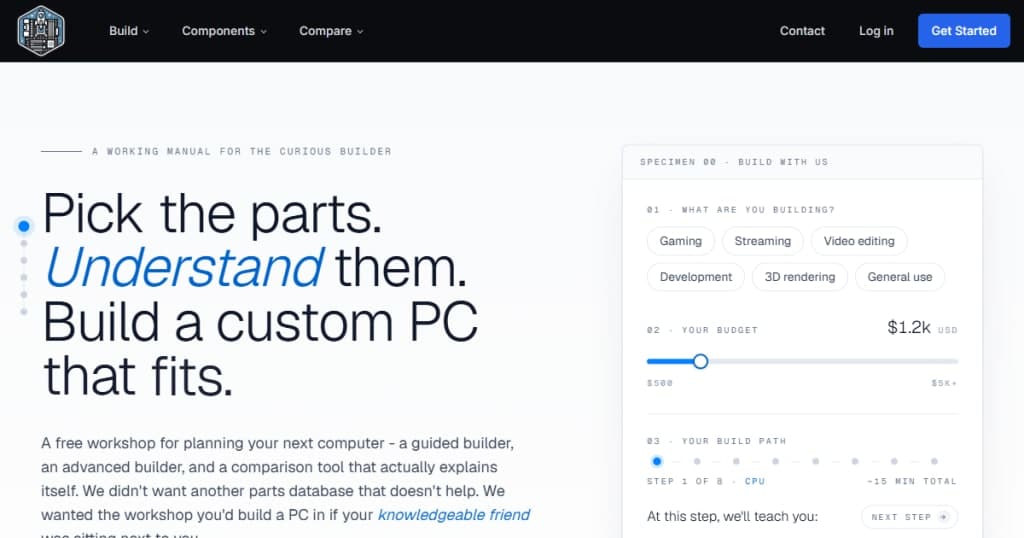
PC Launchpad is a free PC builder and part picker tool designed to assist users in selecting compatible components for their custom builds. It offers two distinct building modes: the Guided Builder and the Advanced Builder.
Guided Builder
The Guided Builder is tailored for those who may not have extensive experience in PC building. Users start by specifying their intended use for the PC (e.g., gaming, content creation, everyday tasks) and setting a budget. From there, PC Launchpad walks them through the selection process step-by-step, providing easy-to-understand explanations for each component.
This feature alleviates the common pain points of selecting parts by breaking down complex specifications into manageable information. Users can confidently choose components that fit their needs without getting lost in technical jargon.
Advanced Builder
For more seasoned builders, the Advanced Builder allows for greater flexibility. Users can choose components in any order while still receiving real-time compatibility checks and budget tracking. This mode is ideal for those who know what they want but need a reliable tool to ensure everything works together seamlessly. It also features a comprehensive component catalog where users can compare parts side-by-side.
The Problem PC Launchpad Solves
Many potential PC builders struggle with the complexities of selecting compatible components and understanding their functions. The challenge often stems from the lack of guidance in existing tools, leading to confusion and frustration.
Common Pain Points
- Compatibility Confusion: New builders may not understand which CPU can pair with which motherboard or what types of RAM are compatible with their chosen components. This often leads to costly mistakes or the need to return parts.
- Overwhelming Choices: With thousands of components to choose from, users often feel lost and overwhelmed. They may find themselves spending hours researching individual parts only to still feel unsure about their choices.
- Budget Constraints: Balancing performance with budget is a common concern. Users may struggle to find parts that offer the best value for their specific needs without stretching their budget too thin.
PC Launchpad addresses these issues by offering a guided experience that educates users on each component's role and importance, allowing them to make informed decisions without feeling overwhelmed.
How PC Launchpad Works
Using PC Launchpad is a straightforward process designed to simplify the PC building journey. Here’s how it typically works:
- Start with Purpose and Budget: Users begin by selecting their intended use case. This could be gaming, content creation, or general use. They also set a maximum budget that they wish to adhere to.
- Component Selection: The tool presents component recommendations based on the user's purpose and budget. Each step includes a detailed explanation of why certain components are recommended.
- Compatibility Checks: As users select components, PC Launchpad performs real-time compatibility checks to ensure that everything will work together seamlessly.
- Budget Tracking: Users can track their total build cost dynamically, which helps prevent overspending.
- Final Review: Once the user has selected all components, they can review their entire build, making adjustments as necessary.
- Save or Share: Finally, users can save their builds or share them with friends or the community for feedback.
PC Launchpad provides a comprehensive, user-friendly interface that makes building a PC accessible for everyone. By focusing on clarity and education, it empowers users to take control of their PC building journey.
Key Features of PC Launchpad
PC Launchpad is packed with features that enhance the user experience and provide the necessary tools for building a custom PC. Here are some of the standout features:
- Guided Builder: A step-by-step walkthrough for beginners, making the component selection process easier and more intuitive.
- Advanced Builder: For experienced users, allowing them to select parts freely while still ensuring compatibility.
- Component Catalog: A comprehensive catalog of components that allows users to compare specifications and prices side-by-side.
- Budget-Aware Recommendations: Suggestions that keep the user’s budget in mind while still providing high-quality options.
- Compatibility Checks: Real-time checks that ensure selected components work together without issues.
- Planning Tools: Additional tools such as the CPU & GPU Balance Calculator and PC Upgrade Checker enhance the building experience, providing insights into performance and future upgrades.
Contextual Importance of Features
The Guided Builder is particularly beneficial for those new to PC building who may feel intimidated by the process. It strips away the complexities and focuses on one decision at a time, making it easier to follow. The Advanced Builder, on the other hand, is perfect for users who prefer to have more control and flexibility in their selections while still benefiting from compatibility checks.
The component catalog offers a wealth of information at the user's fingertips, allowing for informed comparisons. Coupled with the budget-aware recommendations, users can effectively balance performance with cost, ensuring that they get the best value for their investment.
Who PC Launchpad is For
PC Launchpad is designed for a wide range of users, making it an ideal tool for anyone looking to build a custom PC, from hobbyists to professionals. Here are some specific personas that can benefit from using PC Launchpad:
Beginners
- Persona: Alex, a college student interested in gaming but has never built a PC before.
- Jobs-to-be-Done: Alex wants to create a system that can handle modern games without breaking the bank. They need guidance on compatibility and cost-effective choices.
Intermediate Builders
- Persona: Jamie, a digital artist who uses resource-intensive software for graphic design.
- Jobs-to-be-Done: Jamie is familiar with PC components but wants to ensure their selections will meet their performance needs without overspending.
Experienced Builders
- Persona: Sam, a tech enthusiast who enjoys upgrading their setup regularly.
- Jobs-to-be-Done: Sam wants to quickly select new components while ensuring compatibility and tracking costs effectively.
PC Launchpad caters to all these personas by providing tailored experiences that match varying levels of expertise and needs.
PC Launchpad vs Alternatives
While there are several options available in the market for PC building tools, PC Launchpad differentiates itself through its unique combination of guided assistance and advanced features. Here’s how it stacks up against some popular alternatives:
PCPartPicker
PCPartPicker is one of the most well-known PC building tools. It offers extensive compatibility checks and price tracking. However, it lacks the guided experience that PC Launchpad provides, which can make it less user-friendly for beginners.
BuildMyPC
BuildMyPC offers a similar service but tends to be less comprehensive in terms of educational resources. While it allows users to build and compare components, it doesn't guide users through the decision-making process as effectively as PC Launchpad.
Newegg PC Builder
The Newegg PC Builder is another alternative that provides a platform for building PCs. However, it is more focused on the purchasing side of components rather than the educational aspect, which is a key strength of PC Launchpad.
Trade-offs
The primary trade-off with PC Launchpad is that it may not have as extensive a database of components as some of its competitors. However, the emphasis on user education and guided building makes it a strong contender for anyone looking to build a PC without the stress of sifting through complex specifications.
Real-world Use Cases
To illustrate the effectiveness of PC Launchpad, let’s look at some specific scenarios where it can be beneficial:
Scenario 1: Building a Gaming PC
A user named Max wants to build a gaming PC capable of running the latest titles at high settings. Using the Guided Builder, Max selects "Gaming" as the purpose and sets a budget of $1,500. The tool walks him through selecting a compatible CPU, GPU, and other components based on his budget, ensuring he gets the best performance for his money.
Scenario 2: Upgrading a Workstation
Sarah, a video editor, is looking to upgrade her existing workstation. With the Advanced Builder, she quickly selects a new CPU and GPU based on her previous knowledge, while the tool confirms compatibility with her current setup and helps track costs.
Scenario 3: Educational Use
A high school teacher introduces students to PC building concepts. The teacher uses PC Launchpad in class, guiding students through the building process and explaining each component's role. This hands-on experience reinforces learning and demystifies the building process.
Getting Started with PC Launchpad
Ready to begin your PC building journey? Getting started with PC Launchpad is easy and requires no account setup. Simply visit the website, choose whether you want to use the Guided Builder or the Advanced Builder, and start selecting your components. The intuitive interface will guide you through each step, making the process smooth and enjoyable.
FAQ
Is this actually free? What is the catch?
Yes, PC Launchpad is completely free to use, and there is no catch. The platform earns revenue through affiliate links when users purchase components through the site.
Why two builders instead of one?
The Guided Builder is designed for beginners who need assistance, while the Advanced Builder caters to experienced users who prefer a faster interface. Each serves its audience effectively.
How current is the parts data?
PC Launchpad regularly updates pricing from reputable sources like Amazon, and specifications are sourced directly from manufacturers. New parts are added as they launch, ensuring users have access to the latest components.
Do you offer custom builds or prebuilts?
Currently, PC Launchpad does not offer custom builds or prebuilt systems. The focus is on providing research and build tools, though this may be explored in the future.
Can I save my builds?
Yes, users can save their builds for later reference or to share with others for feedback.
What if I have more questions?
PC Launchpad offers a comprehensive support section on their website, and users can also reach out directly for assistance with any specific inquiries.
Bottom Line
PC Launchpad provides a valuable resource for anyone looking to navigate the world of custom PC building. By combining guided assistance with advanced features, it caters to both beginners and experienced users alike. Whether you're building your first gaming rig or upgrading your workstation, PC Launchpad simplifies the process, making it more accessible and enjoyable. Ready to embark on your PC building journey? Start exploring PC Launchpad today!
Learn more about PC Launchpad.