The Challenge of Content Creation in the Digital Age
In today's fast-paced digital landscape, creating high-quality images and videos can be a daunting task. Whether you're a small business owner looking to enhance your product photography or a social media manager striving to keep your content fresh and engaging, the pressure to produce captivating visuals is immense. Traditional methods often involve complex software, a steep learning curve, and significant time investment, which can be overwhelming for many.
Moreover, as trends on social media evolve rapidly, staying ahead of the curve requires not just creativity but also agility in content creation. How can you ensure your visuals stand out without spending hours in front of a screen or investing in expensive photography sessions? This is where Plimo comes into play, offering a streamlined solution to help you generate stunning images and videos quickly and easily.
What is Plimo?
Plimo is an innovative all-in-one platform designed for generating AI images and videos. It brings together the latest models from leading AI companies, including Google and OpenAI, to provide users with an extensive library of templates and tools. The platform is built on the principle that creating captivating visuals shouldn't require juggling multiple applications or subscriptions.
With Plimo, users can create everything from animated family photos to product shots for e-commerce, all from a single account. The platform offers a variety of AI models specifically tailored for different tasks, ensuring that you have the right tool for your creative needs.
Plimo's user-friendly interface allows even those with minimal technical skills to produce professional-quality results. You can start with a template or write your own prompt, choose from a selection of AI models, and generate stunning visuals in just a few clicks, all without any watermarks on the final product.
The Problem Plimo Solves
Many creators and businesses struggle with the complexities of traditional content creation processes. The challenges can be summed up as follows:
- Time-Consuming Processes: Creating images or videos often involves using multiple software tools, each with its own learning curve. The need to switch between applications can lead to wasted time and frustration.
- High Costs: Hiring professional photographers and videographers can be prohibitively expensive, especially for small businesses or individual creators.
- Lack of Technical Skills: Not everyone has the technical know-how to navigate advanced design software, making it difficult to produce high-quality content.
- Staying Relevant: As trends change rapidly, keeping your content up-to-date with the latest styles and formats can be challenging without the right tools.
Plimo addresses these pain points by consolidating everything you need into one platform. You can quickly create engaging visuals without the hassle of learning complex software or managing multiple subscriptions.
How Plimo Works
Using Plimo is straightforward, making it accessible for anyone, regardless of their technical expertise. Here’s a step-by-step guide on how to use the platform:
- Pick a Tool: Start by selecting the type of content you want to create. This could be an image, video, or even an animated GIF. Plimo’s tools range from AI Image Generators to AI Video Generators, depending on your needs.
- Upload a Photo or Write a Prompt: If you have a specific image in mind, upload it. Alternatively, you can write a descriptive prompt to guide the AI in generating the content you envision.
- Choose a Model: Plimo features several AI models, each optimized for different tasks. For instance, you might choose OpenAI’s GPT Image model for text-heavy images or Google’s Nano Banana for complex scenes combining multiple elements.
- Generate and Download: Once you’ve made your selections, click the generate button. You’ll see the credit cost upfront, and if the generation fails, you’ll receive a full credit refund. After the generation, you can download your image or video without any watermarks.
This simplicity is a key feature of Plimo, setting it apart from other platforms that often require extensive training and experience.
Key Features of Plimo
- User-Friendly Interface: Plimo is designed for ease of use, allowing anyone to create stunning visuals without prior experience.
- Diverse AI Models: Access to multiple AI models allows for a broad range of creative possibilities. Users can choose the best model based on the content type they are creating.
- Trending Templates: Plimo offers a library of templates based on current social media trends, making it easy to create relevant and engaging content.
- No Watermarks: All generated images and videos come without watermarks, allowing for professional use right out of the gate.
- Flexible Credits System: Users can start with 100 free credits and purchase additional credits as needed. Each failed generation refunds you the credit, reducing the risk of wasted resources.
- Support for Multiple Languages: Plimo is available in 14 languages, making it accessible to a global audience.
These features mean that whether you’re a small business owner looking to enhance your online presence or a content creator aiming to engage your audience, Plimo equips you with the tools necessary to succeed.
Who Plimo is For
Plimo caters to a diverse range of users:
- Small Business Owners: Those who need high-quality product images or promotional videos without the budget for professional photography services.
- Content Creators and Influencers: Individuals who rely on engaging visuals for their online presence, such as social media posts, blogs, and marketing materials.
- Marketers: Professionals looking for a quick way to generate visuals for campaigns, ads, and social media content.
- Educators and Students: Users seeking to create educational materials or presentations that require engaging visuals or animations.
Each of these personas can benefit from Plimo's streamlined approach to content creation, making it easier to produce the visuals they need without the traditional hassles.
Plimo vs Alternatives
When comparing Plimo with other AI image and video generation tools, several key differences emerge:
- Comprehensive Toolkit: Unlike platforms like Canva or Adobe Spark, which focus more on design templates and static images, Plimo integrates both image and video generation into a single account, simplifying the process for users who need varied content types.
- Access to Multiple AI Models: While tools like DALL-E focus on a single model for image generation, Plimo offers a variety of models from different companies, allowing users to experiment and find the best fit for their needs. This feature also enhances the potential for unique and creative outputs.
- Cost-Effective Credits System: Many competitors require a subscription model, which can be a barrier for casual users. Plimo’s credit system allows for flexibility and affordability, as you only pay for what you use.
- No Watermarks: In contrast to many free tools that impose watermarks on generated content, Plimo ensures that all outputs are clean and ready for professional use.
These distinctions make Plimo a compelling choice for anyone serious about their content creation efforts. For a side-by-side comparison, consider checking out alternatives like Canva, Adobe Creative Cloud, or DeepAI for AI-generated visuals, but keep in mind the unique advantages Plimo brings to the table.
Real-World Use Cases
Here are some specific scenarios illustrating how different users can leverage Plimo:
-
E-commerce Product Photography: A small business owner sells handmade candles online. They take a simple photo of their product and upload it to Plimo, selecting a template for a professional-looking product shot on a marble countertop. The result is a polished image that enhances their online listings and attracts more buyers.
-
Social Media Content Creation: A social media manager needs to generate engaging content for a brand's Instagram page. They use Plimo to create a series of animated GIFs that showcase the brand's latest products, making it easy to maintain a visually appealing feed that resonates with followers.
-
Personalized Gifts: An individual wants to surprise a friend with a unique birthday gift. They use Plimo to animate an old photo of them together, adding movement and sound. The final product is a heartwarming video that captures a cherished memory, perfect for sharing on social media.
-
Visual Storytelling for Blogs: A blogger wants to create a captivating header image for their latest post. They describe the scene they envision using Plimo’s AI Image Generator, generating an eye-catching visual that enhances the overall appeal of their article.
-
Educational Presentations: A teacher is preparing a presentation on climate change and needs visuals to illustrate their points. They use Plimo to generate infographics and animated clips that make their lesson more engaging and informative for students.
Getting Started with Plimo
Ready to revolutionize your content creation process? Getting started with Plimo is simple:
- Visit Plimo.
- Sign up for a free account, where you’ll receive 100 credits to begin your creative journey without the need for a credit card.
- Explore the various tools and templates available, and start generating stunning images and videos for your projects.
With a user-friendly interface and an extensive library of resources, Plimo makes it easy to bring your creative ideas to life.
FAQ
What types of content can I create with Plimo?
Plimo allows you to generate a wide variety of content, including images, videos, GIFs, and even animations based on your ideas or uploaded photos.
Do I need any design skills to use Plimo?
No, Plimo is designed to be user-friendly, so you don’t need any prior design experience to create stunning visuals. Templates are provided to help guide you.
How much does Plimo cost?
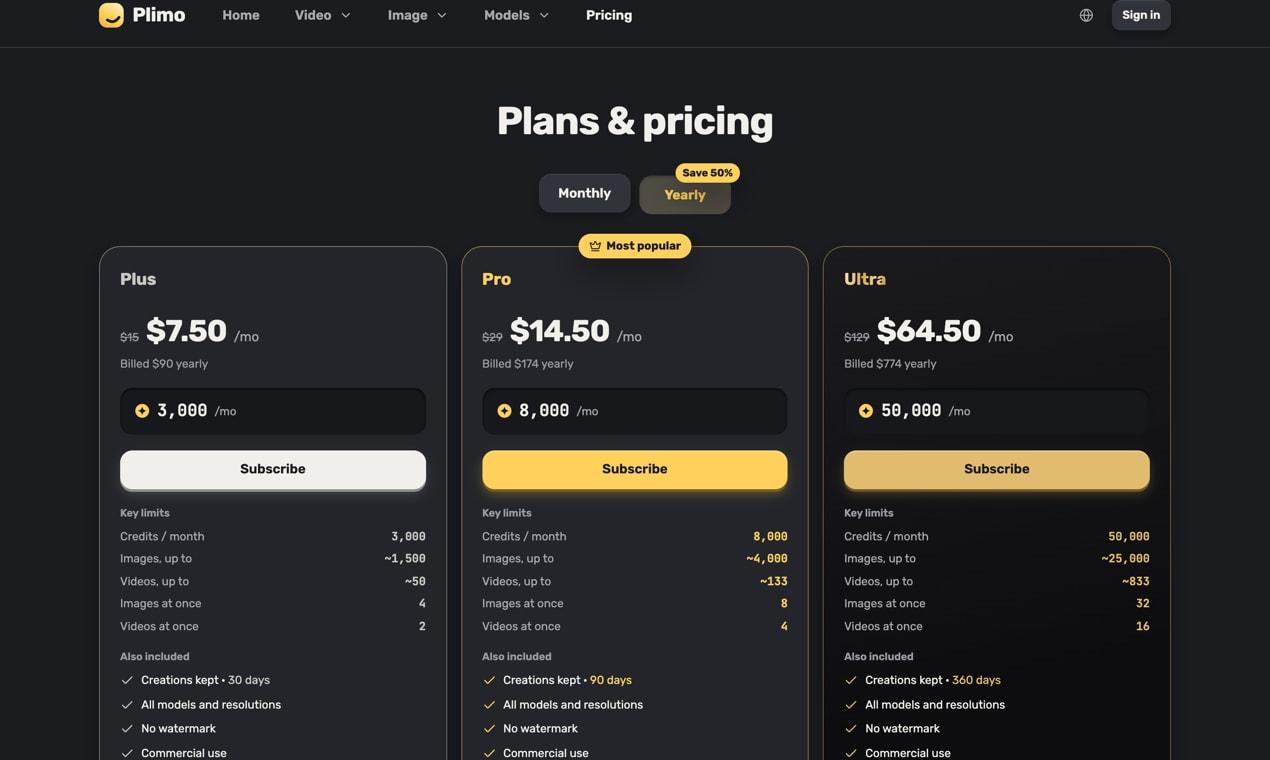
Plimo offers a free account with 100 credits, and additional credits can be purchased as needed. Monthly plans start at $15, with discounted yearly options available.
Is there a watermark on the generated content?
No, all content generated through Plimo comes without a watermark, allowing you to use it freely for personal or commercial purposes.
Can I use Plimo for commercial projects?
Yes, with a paid membership, you can use the images and videos created with Plimo for commercial purposes, making it ideal for business owners and marketers.
How often are new models added to Plimo?
Plimo continuously updates its library with new AI models and templates to keep up with the latest trends and technologies in content creation.
Bottom Line
Plimo is a powerful solution for anyone looking to simplify the process of creating high-quality images and videos. By combining the latest AI models with user-friendly tools and templates, it enables users to generate stunning visuals quickly, without the need for extensive design knowledge or resources. Whether you're a small business owner, a content creator, or someone just looking to have fun with visuals, Plimo has something to offer.
Start your journey towards effortless content creation by visiting Plimo today!
Learn more about Plimo.