The Challenge of Creating Engaging Video Content
In today's fast-paced digital environment, the demand for video content is at an all-time high. From educators looking to enhance their teaching materials to marketers striving for engaging promotional content, creating professional-grade videos can be a daunting task. Many individuals and teams find themselves overwhelmed by the complexities of video editing software, steep learning curves, and the sheer time investment required to produce high-quality videos.
Imagine you are an educator preparing for a class—your PowerPoint slides are insightful, but they lack the engagement factor that video can provide. Or consider a marketing team that has to create promotional videos from written content, only to find that traditional video editing tools are too complicated and time-consuming.
This is where Vidsembly comes into play, offering a streamlined solution to transform existing content into polished, narrated videos without the need for extensive video editing skills.
What is Vidsembly?
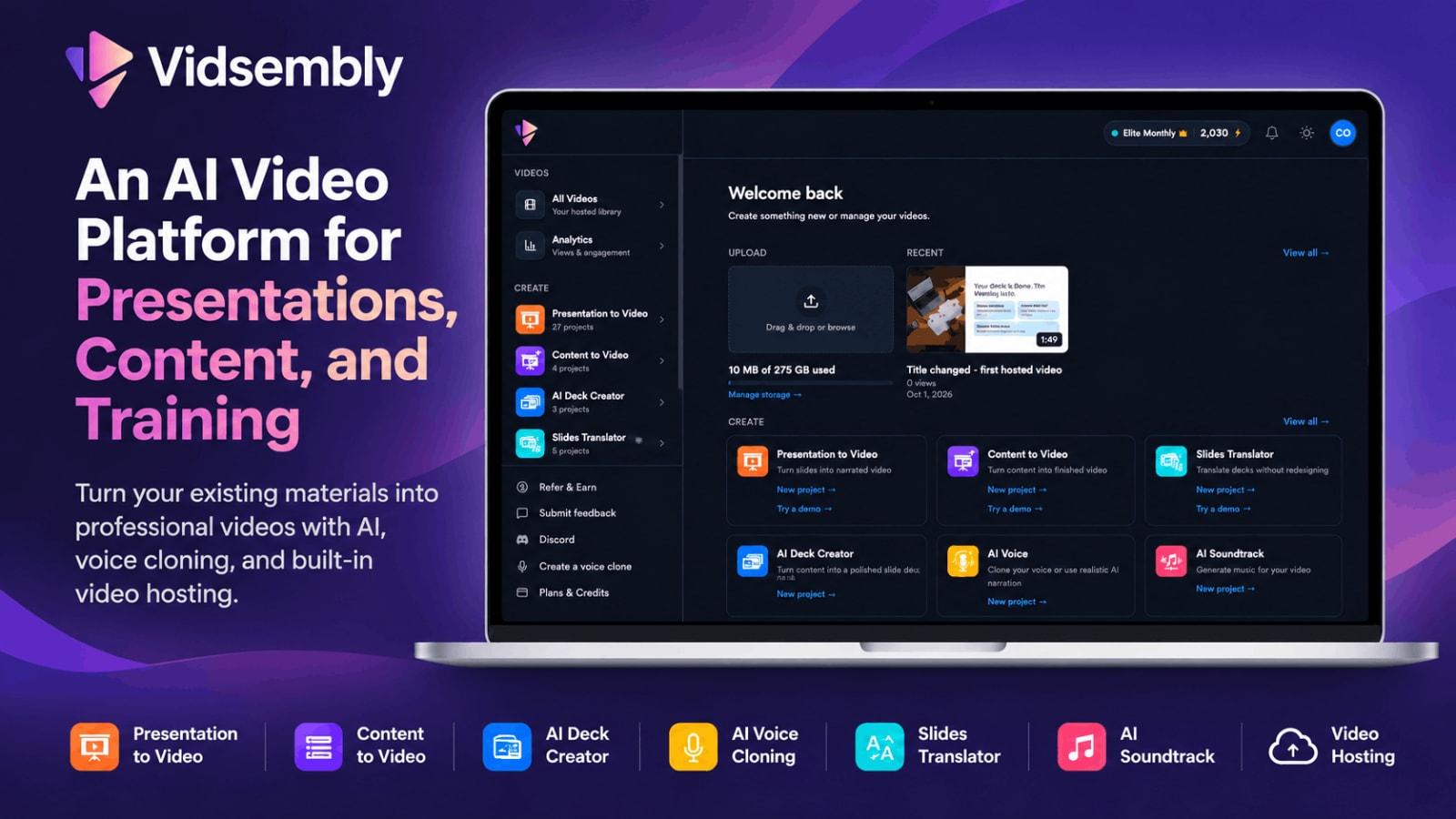
Vidsembly is an innovative AI-powered video creation toolkit designed to simplify the video production process. It allows users to convert PowerPoint presentations, PDFs, and other documents into engaging narrated videos using AI-generated voiceovers or their own cloned voice. The platform is built to cater to a range of users, including educators, HR teams, sales professionals, and anyone needing to produce video content quickly and efficiently.
The core functionality of Vidsembly includes several key tools:
- Presentation to Video: Transform existing PowerPoint slides or PDFs into fully narrated videos with ease.
- Content to Video: Create videos from written content, automatically generating slides and narration.
- AI Deck Creator: Generate PowerPoint presentations directly from text or documents, saving time on design.
- AI Voice Cloning: Users can clone their voice for narration, adding a personal touch to their videos.
- Slides Translator: Translate presentations into multiple languages while maintaining the original design.
- Transcriber: Convert audio or video recordings into exportable transcripts.
- AI Soundtrack: Generate custom background music for video projects to enhance viewer engagement.
- Video Hosting: Publish videos, share links, embed players, and track viewer analytics directly within the platform.
By offering a cohesive suite of tools, Vidsembly eliminates the need to juggle multiple software applications, making it easier for users to focus on content creation rather than production logistics.
The Problem Vidsembly Solves
For many professionals, the challenge of producing video content is not just about having the right tools but also about overcoming common pain points associated with traditional video production:
- Complex Software: Many video editing software options are packed with features but require a steep learning curve, which can deter users from even attempting to create videos.
- Time Consumption: Traditional video creation can be incredibly time-consuming, especially when users have to start from scratch or juggle various platforms for voiceovers, visuals, and editing.
- Resource Limitations: Not everyone has access to high-quality voice actors or video editors, making it difficult to produce polished content.
- Inconsistent Quality: Without the right skills, the quality of DIY videos can vary significantly, leading to unprofessional results that do not engage audiences.
Vidsembly addresses these issues by providing a user-friendly interface and intuitive workflows that guide users through the video creation process, ensuring that anyone—regardless of technical expertise—can produce professional-quality videos.
How Vidsembly Works
Creating videos with Vidsembly is a straightforward process, broken down into several simple steps. Here’s a typical workflow for transforming a PowerPoint presentation into a narrated video:
- Upload Your File: Start by uploading your PowerPoint (PPTX, PPT) or PDF file to the Vidsembly platform. The tool preserves your slide layout for easy narration.
- Generate or Import Your Script: You can import speaker notes from your presentation or generate a narration script for each slide using Vidsembly’s AI tools. This step allows for customization and refinement of the text before recording.
- Select a Voice: Choose from a library of AI voices or use your cloned voice for narration. Vidsembly offers a selection of options in different languages and accents, allowing users to find the perfect fit for their audience.
- Preview and Export: After selecting your voice, preview the finished video. If you’re satisfied with the result, you can download the video as an MP4 file or regenerate it with a new voice or script if needed.
This guided process enables users to create videos efficiently, minimizing the hassle associated with traditional video editing.
Key Features of Vidsembly
Vidsembly comes packed with features that enhance its usability and effectiveness in video creation. Here’s a closer look at some of the standout offerings:
- Presentation to Video: Easily convert presentations into narrated videos while maintaining original formatting.
- Content to Video: Automatically generate video content from written documents, saving time and effort.
- AI Deck Creator: Generate PowerPoint presentations from text, allowing users to create visual materials quickly.
- AI Voice Cloning: Clone your own voice for a personalized touch, ensuring consistent branding in your videos.
- Slides Translator: Translate presentations into various languages, making your content accessible to a broader audience.
- Transcriber: Effortlessly create transcripts from audio and video files, which can be valuable for accessibility and record-keeping.
- AI Soundtrack: Generate custom background music to enhance viewer engagement and set the desired tone.
- Video Hosting: Host and share videos with embedded players and comprehensive analytics to track performance.
These features collectively empower users to produce high-quality video content without the need for specialized skills or extensive resources. For example, a marketing team can use Vidsembly to quickly create promotional videos that are visually appealing and professionally narrated, thus saving time and improving the quality of their outreach efforts.
Who Vidsembly is For
Vidsembly is designed for a diverse range of users, making it a versatile tool for various industries and roles. Here are some key personas that can benefit from its capabilities:
- Educators: Teachers and trainers can transform lectures and presentations into engaging video content, making learning more accessible and enjoyable for students.
- HR and Employee Training Teams: Create onboarding and compliance training videos efficiently, enabling new hires to get up to speed quickly.
- Sales Professionals: Sales teams can convert pitch decks into polished videos that enhance their presentations and resonate with potential clients.
- Marketers: Marketing teams can produce promotional videos from existing content, increasing engagement across channels without the need for extensive video editing skills.
- Internal Communications Teams: Companies can use Vidsembly to repurpose updates and communications into clear, engaging video messages for employees.
By understanding the needs of these diverse users, Vidsembly delivers a set of tools that meet the unique demands of each role while simplifying the video creation process.
Vidsembly vs Alternatives
While Vidsembly stands out as a comprehensive solution for video creation, it’s essential to consider how it compares to other available options in the market. Here’s a closer look at how Vidsembly stacks up against some of its competitors:
- Camtasia: Known for its robust video editing capabilities, Camtasia offers more features for advanced users but can be complex for beginners. Vidsembly, on the other hand, focuses on simplicity and speed, making it more accessible to users without video editing experience.
- Loom: This tool is excellent for quick video messaging and screen recording but lacks the comprehensive features of Vidsembly for transforming existing content into videos. Loom is primarily focused on live recording rather than content conversion.
- Powtoon: Primarily aimed at creating animated videos, Powtoon is great for visual storytelling but may not be as effective for users needing to convert static presentations or documents into videos. Vidsembly caters to a broader range of content types, including PowerPoint and PDFs.
- Animaker: While Animaker offers a user-friendly interface for animated content, it doesn’t support the same level of document and presentation conversion that Vidsembly provides. Users looking to transform existing materials will find Vidsembly's tools more fitting for their needs.
Overall, Vidsembly offers a unique blend of features tailored to users seeking efficiency in video creation without sacrificing quality. Its focus on document and presentation conversion sets it apart in a crowded market.
Real-World Use Cases
To illustrate the effectiveness of Vidsembly, here are a few specific scenarios where teams successfully utilized the platform:
- Educational Institutions: A university professor used Vidsembly to convert their lecture slides into narrated videos for online courses. This allowed students to engage with the material at their own pace, improving overall comprehension.
- Corporate Training: An HR team created a series of onboarding videos for new hires, utilizing Vidsembly to transform existing training materials into engaging video formats. This streamlined the onboarding process while ensuring consistent messaging across all new hires.
- Sales Presentations: A sales team converted their presentation decks into polished videos using Vidsembly. This provided a professional touch to their pitches, helping them to secure more client meetings.
- Marketing Campaigns: A marketing agency used Vidsembly to quickly create promotional videos from blog posts, effectively increasing their content marketing reach through engaging video formats.
- Internal Communications: A company used Vidsembly to convert internal updates and announcements into videos, making it easier for employees to stay informed and engaged with company news.
These examples showcase how versatile and valuable Vidsembly can be across various industries and use cases.
Getting Started with Vidsembly
If you're ready to enhance your content creation process, getting started with Vidsembly is straightforward. You can visit the Vidsembly website to create a free account, allowing you to explore the platform's capabilities without any initial investment.
Once you sign up, you'll receive 30 free credits to begin using the tools. This lets you test features like voice cloning, presentation to video, and more without a credit card required. As you become more familiar with the platform, you can explore paid plans that offer additional credits and features to support your growing needs.
FAQ
What file types can I upload to Vidsembly?
Vidsembly allows users to upload various file types depending on the tool being used. For the Presentation to Video tool, you can upload PPTX, PPT, and PDF files. The Transcriber supports audio files such as MP3, MP4, WAV, and M4A.
Do I need video editing experience to use Vidsembly?
No, Vidsembly is designed for users without any video editing experience. The platform uses a guided, conversational workflow that simplifies the process of creating videos.
Can I clone my own voice for narration?
Yes, Vidsembly allows you to clone your voice. The free plan includes one voice clone, while paid plans offer additional cloning options, enabling you to narrate videos in your own voice.
How do Vidsembly credits work?
Credits are used when generating videos, voiceovers, and transcripts. New users receive 30 free credits upon signing up, and paid plans provide monthly credits that can be used across all tools.
Is there a free plan available?
Yes, Vidsembly offers a free plan that includes 30 one-time credits and access to basic features. However, free exports include a watermark. Paid plans remove watermarks and offer additional features like HD exports and premium voices.
How is Vidsembly different from free tools?
While Vidsembly does offer some free tools for quick tasks, the full platform provides saved projects, credits, and core creation capabilities. The app is geared towards comprehensive content creation, unlike one-off browser tools.
Bottom Line
Vidsembly is a powerful yet accessible platform that revolutionizes the way users create video content from existing materials. By combining various AI-powered tools into one cohesive solution, it helps teams produce high-quality videos quickly and efficiently. Whether you're an educator, marketer, or corporate trainer, Vidsembly empowers you to transform your content into engaging videos without needing extensive video editing skills.
Ready to streamline your video creation process? Start your journey with Vidsembly today and discover how easy it can be to turn your presentations and documents into captivating videos.
Learn more about Vidsembly.