The Challenge of App Store Optimization
In the ever-competitive landscape of mobile applications, developers face a multitude of challenges when it comes to making their app stand out in the App Store. With millions of apps available, achieving visibility and attracting downloads can feel daunting. For indie developers and solo app founders, the task is further complicated by the need to manage multiple tools for App Store Optimization (ASO). This often leads to inefficiencies and increased costs as they juggle between various platforms for keyword research, competitor analysis, and screenshot generation.
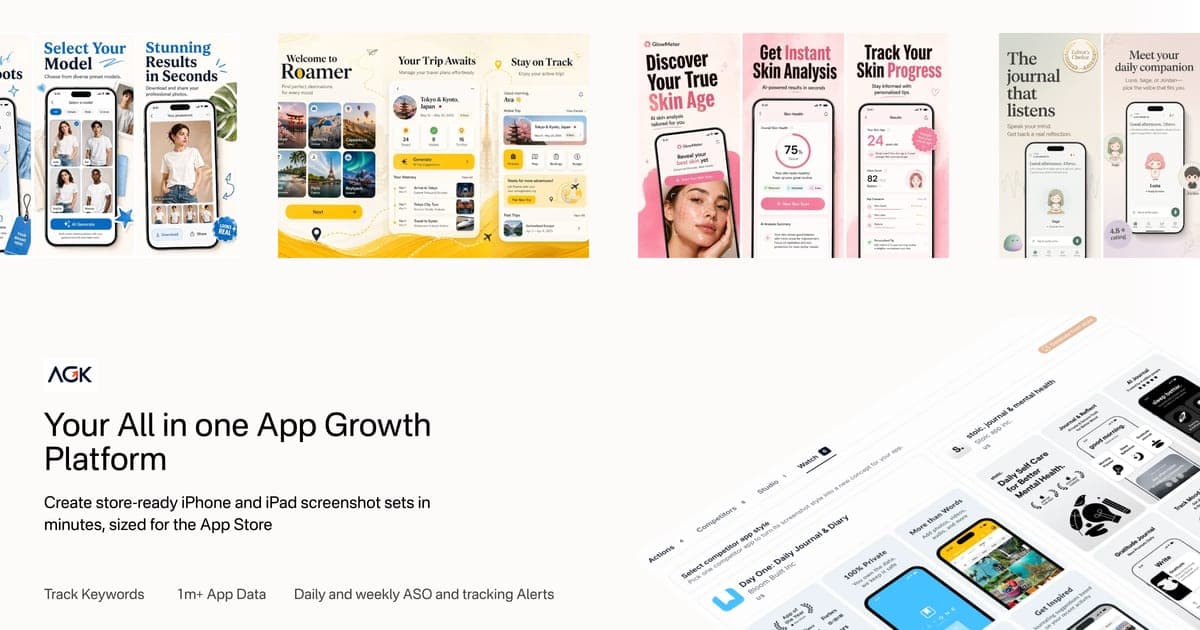
Enter AppGrowKit: ASO-Powered App Store Screenshot Generator, a tool designed to consolidate the ASO process into one seamless workspace. By combining multiple functionalities such as keyword tracking and screenshot creation, AppGrowKit simplifies the workflow for developers, allowing them to focus on what truly matters: enhancing their app's visibility and conversion rates.
What is AppGrowKit: ASO-Powered App Store Screenshot Generator?
AppGrowKit is a comprehensive platform that empowers app developers to create visually appealing app screenshots directly tied to their ASO strategies. The tool takes raw app screens, integrates keyword insights, and analyzes competitor contexts to produce screenshots that not only look great but also resonate with user search intent.
The platform features an intuitive interface that allows users to import their existing app screens or start from scratch. This means that even if developers don't have polished visuals to begin with, they can still create stunning app screenshots. AppGrowKit also supports localization, making it easier to adapt screenshots for different markets and languages.
Key Functionalities of AppGrowKit
- Keyword Research: Users can identify the most relevant keywords for their app by analyzing demand, competition, and relevance.
- Competitor Tracking: The platform allows users to monitor competitor apps, gaining insights into their strategies and performance.
- Review Insights: AppGrowKit provides summaries of user reviews, helping developers understand what features are appreciated and which areas need improvement.
The Problem AppGrowKit Solves
Managing app store optimization typically requires a multi-faceted approach involving various tools and subscriptions. Developers often need to switch between platforms for different tasks, leading to confusion and wasted resources. This fragmented approach makes it difficult for indie developers to keep track of keyword performance, analyze competitor strategies, and create effective screenshots—all of which are crucial for increasing app visibility and downloads.
AppGrowKit addresses these pain points by offering an all-in-one solution that integrates the essential elements of ASO into a single workspace. This helps eliminate the hassle of managing multiple subscriptions and reduces the risk of overlooking important data. By streamlining the ASO process, developers can focus on enhancing their app listings and driving downloads without getting bogged down by administrative tasks.
How AppGrowKit Works
Getting started with AppGrowKit is straightforward. Here’s a step-by-step guide on how to use the platform effectively:
- Sign Up: Create an account on the AppGrowKit website. New users receive 10 free screenshot credits, enabling them to test the platform without any upfront commitment.
- Import Screenshots: Users can upload their existing app screenshots or paste their App Store URL to automatically import app visuals and listing copy.
- Conduct Keyword Research: Utilize the built-in keyword research tool to identify relevant keywords that match user intent. This tool provides insights into demand, competition, and relevance, helping developers choose the best keywords to target.
- Analyze Competitors: Explore competitor apps to understand their strengths and weaknesses. This insight is invaluable for shaping your own app's positioning and messaging.
- Generate Screenshots: With the gathered insights, users can create stunning app screenshots tailored to their ASO strategy. The platform offers customizable templates and design options, allowing developers to craft unique visuals.
- Track Performance: Once the app is live, users can track keyword rankings, monitor reviews, and receive insights on user sentiment. This ongoing analysis helps in making data-driven decisions for future updates.
- Optimize Listings: Based on performance data, developers can iterate on their app listings, updating screenshots and keywords as necessary to enhance visibility and conversion rates.
By following these steps, developers can maximize their ASO efforts and create compelling app listings that resonate with their target audience. For more information on how to implement this workflow, consider visiting AppGrowKit: ASO-Powered App Store Screenshot Generator.
Key Features of AppGrowKit: ASO-Powered App Store Screenshot Generator
AppGrowKit is packed with features designed to streamline the app store optimization process. Here are some of the key functionalities:
- Customizable Screenshot Templates: Create visually appealing screenshots tailored to your app's branding and target audience.
- Keyword Tracking: Monitor the performance of chosen keywords daily, allowing for timely adjustments to your ASO strategy.
- Competitor Insights: Understand how competing apps are performing and learn from their successes and shortcomings.
- Review Summaries: Analyze user feedback through summarized insights, helping you prioritize updates based on real user needs.
- Localization Support: Easily translate app screenshots into multiple languages, ensuring your app appeals to global audiences.
The integration of these features into a single platform not only saves time but also enhances the overall efficiency of the ASO process. By having everything in one place, developers can make informed decisions that lead to improved app visibility and user engagement.
Who AppGrowKit is For
AppGrowKit is primarily designed for indie developers and solo app founders who are looking to optimize their app store listings without the need for extensive resources. These users typically face challenges such as budget constraints and limited access to sophisticated ASO tools.
Concrete Personas
- Indie Developer: A solo developer creating a habit tracking app who wants to improve their app’s visibility but struggles with creating effective screenshots and conducting keyword research.
- Startup Founder: The founder of a small app development startup looking for an affordable way to manage ASO efforts without hiring a dedicated marketing team.
- Freelancer: A freelancer managing multiple app projects for clients, needing a streamlined tool to optimize each app’s performance in the App Store.
By catering to these personas, AppGrowKit provides essential tools that enable users to compete effectively in the crowded app marketplace.
AppGrowKit vs Alternatives
When exploring ASO tools, developers often consider several alternatives. Here’s how AppGrowKit stacks up against its competitors, including TryAstro and Appfigures.
TryAstro
TryAstro offers a range of ASO features, including keyword suggestions and basic listing optimization. However, it does not include a dedicated screenshot workflow or review insights, which are critical for developing a comprehensive ASO strategy. Pricing for TryAstro starts around $9, but users may find themselves needing additional tools to fill the gaps left by this platform.
Appfigures
Appfigures is another popular alternative that offers market data and review aggregation, but it comes with a higher price tag starting at $25 per month. While it provides valuable insights, it lacks integrated screenshot creation and ASO creative workflows, forcing users to rely on separate tools for those tasks. This can lead to inefficiencies, especially for solo developers managing tight budgets.
In contrast, AppGrowKit provides a holistic approach to ASO with its all-in-one platform. Starting at just $9 per month, it combines essential features like screenshot generation, keyword tracking, and review insights without the need for multiple subscriptions. This makes it a more cost-effective solution for indie developers looking to optimize their app listings.
Real-World Use Cases
- App Launch: An indie developer launches a new productivity app and uses AppGrowKit to generate eye-catching screenshots that highlight key features. By analyzing competitor listings, they tailor their keywords to improve visibility in the App Store.
- App Update: A solo founder receives feedback from users indicating confusion about a specific feature. They use the review insights from AppGrowKit to identify the common issues and update their screenshots accordingly, leading to a 20% increase in downloads after the update.
- Keyword Optimization: An app developer tracks the performance of their keywords using AppGrowKit’s daily monitoring. They notice a drop in rankings for a specific keyword and adjust their app’s description and screenshots to better align with user intent, resulting in a recovery in rankings.
- Localization Efforts: An app creator targets international markets and uses AppGrowKit to translate their app screenshots into 12 different languages, increasing their app's visibility in non-English speaking countries.
- Competitor Analysis: A developer compares their app’s performance with that of a top competitor using AppGrowKit’s insights. They identify successful strategies that the competitor employs and adapt their own marketing approaches to better compete.
Getting Started with AppGrowKit: ASO-Powered App Store Screenshot Generator
Getting started with AppGrowKit is simple and straightforward. To try it out, visit AppGrowKit: ASO-Powered App Store Screenshot Generator and sign up for a new account. You’ll receive 10 free screenshot credits to test the platform without any financial commitment.
Once you're set up, you can explore the various features, from keyword research to screenshot generation, and start optimizing your app store listings effectively. The user-friendly interface guides you through each step, making it easy to create compelling app visuals and track performance.
FAQ
Is there a free trial or free credits on signup?
Yes. Every new account gets 10 screenshot credits with no credit card required.
Do I own the screenshots I generate?
Yes. You get full commercial rights to use AppGrowKit output on various platforms.
What if I don’t have polished app screens to upload?
You can paste your App Store URL, and AppGrowKit will import your existing screens and listing copy.
Can I localize screenshots for other markets?
Yes. You can translate screenshot copy into 12+ languages and maintain consistent layouts.
How does keyword tracking work?
AppGrowKit tracks daily keyword rankings and provides insights into performance, helping you adjust your ASO strategy as needed.
What types of apps benefit most from AppGrowKit?
Indie developers, solo founders, and small startups looking to optimize app store listings and improve conversion rates will find AppGrowKit particularly beneficial.
Bottom Line
AppGrowKit: ASO-Powered App Store Screenshot Generator offers an integrated solution for app developers looking to streamline their ASO efforts. By combining screenshot generation with keyword insights and competitor analysis, it eliminates the need for multiple subscriptions and provides a cohesive workflow that enhances visibility and conversion rates.
Whether you're an indie developer just starting or a seasoned founder looking to optimize your app’s performance, AppGrowKit equips you with the tools necessary to create stunning app visuals and effectively manage your ASO strategy. Don't hesitate to sign up and take advantage of the free credits to explore its capabilities today!