Understanding the Financial Management Dilemma in the Digital Age
In today's digital landscape, managing finances for freelance projects, small studios, or agencies can feel like an overwhelming battle. With numerous subscription services, APIs, and tools that contribute to both expenses and revenue, it becomes increasingly difficult to keep track of what you are spending versus what you are earning. Each service comes with its own dashboard, and when payments start to pile up, it’s easy to lose sight of where your money is going and how much you've earned. This is where CreditBar comes into play—offering a streamlined solution to track both sides of your financial ledger directly from your macOS menu bar.
Imagine you’re an indie developer using multiple AI models, image processing tools, and cloud services. You might have expenses rolling in from services like OpenAI, Stripe, and Shopify, but without a comprehensive view of your spend versus your revenue, it’s challenging to make informed business decisions. CreditBar simplifies this by allowing you to monitor your financial health at a glance, ensuring you know when a balance is running low and what income is coming in.
What is CreditBar?
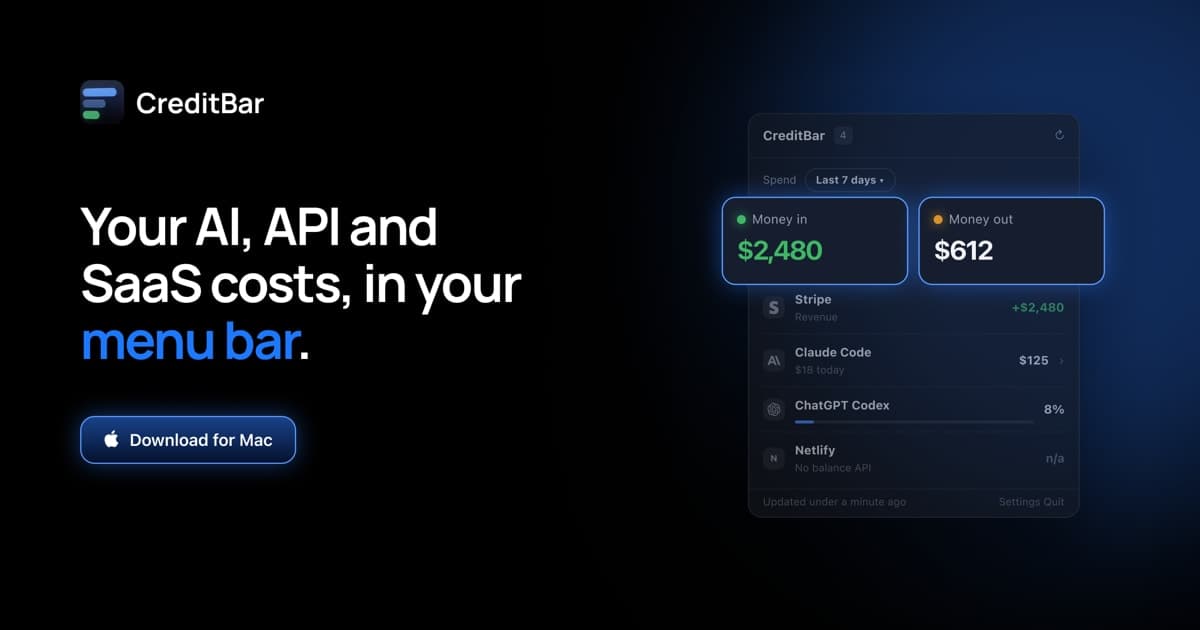
CreditBar is an innovative macOS application designed to provide users with a clear picture of their financial transactions right from the menu bar. Unlike other financial trackers that focus solely on either income or expenses, CreditBar integrates both aspects into one cohesive interface. It tracks your expenditures across over 100 service providers, including AI models, video processing, and payment gateways, while simultaneously monitoring your revenue through platforms like Stripe, WooCommerce, and Dodo Payments.
CreditBar operates entirely on your Mac, ensuring that sensitive information stays local. It requires no subscriptions—just a one-time purchase—and uses macOS Keychain to securely store your API keys. This not only simplifies the setup process for users but also enhances security, eliminating the risk of data breaches associated with cloud-based services. Whether you are an indie hacker or running a small studio, CreditBar centralizes your financial management, making it easier to track what comes in and what goes out.
The Problem CreditBar Solves
For many small businesses and freelancers, the challenge of managing multiple accounts across various platforms can lead to inefficiencies and costly mistakes. You might find yourself scrambling to check each provider’s dashboard separately, only to discover that a service has run out of balance at the worst possible moment—causing downtime or disruptions in service delivery.
The pain points are clear:
- Visibility: Many users lack a single view of their financial standing, making it hard to gauge profitability.
- Time-consuming: Constantly switching between platforms to check balances takes time and focus away from core business activities.
- Surprise expenses: Without alerts or reminders, balances can run out without warning, leading to unexpected service interruptions.
CreditBar addresses these issues by providing a unified view of all your financial transactions. By showing real-time balances, today’s spending, and month-to-date revenue in your menu bar, you can quickly assess your financial health and make informed decisions without the need to navigate multiple dashboards.
How CreditBar Works
Using CreditBar is straightforward and user-friendly. Here’s a step-by-step workflow to get you started:
- Install and Open CreditBar: Download CreditBar from CreditBar and install it on your macOS system.
- Connect Your Accounts: Add your various service providers by entering the required API keys. CreditBar supports over 100 providers, including popular ones like OpenAI and Stripe.
- Set Up Tags: Tag your accounts based on client or project names. This allows you to view costs and revenue by individual projects, making it easier to assess profitability.
- Monitor Balances: Once set up, CreditBar will display your balances in the menu bar. You will see both income and expenses side by side.
- Receive Alerts: CreditBar will notify you when your balance reaches critical levels, giving you ample time to replenish funds before services are interrupted.
- Utilize Widgets: Use desktop widgets for an at-a-glance view of your finances without the need to click into the app.
- Review Historical Data: Access your spending and revenue history to identify trends over time, helping you make informed decisions for future projects.
By following these steps, you can ensure that your financial management is efficient and effective, allowing you to focus on what you do best—creating and delivering value to your clients.
Key Features of CreditBar
- Comprehensive Tracking: Monitor both expenditures and revenues across over 100 providers, ensuring you have a complete financial overview.
- Real-Time Alerts: Get notified when your balances are running low, helping prevent service disruptions and unexpected costs.
- Client/Project Tagging: Organize your accounts by client or project to easily analyze profitability and spending.
- Local Data Storage: Enjoy peace of mind knowing your data stays on your Mac, enhancing security and privacy.
- One-Time Purchase: Avoid recurring subscription fees with a simple one-time payment, making it budget-friendly for users.
These features work together to provide a seamless experience, ensuring that you can manage your finances without the hassle of multiple apps or services. By keeping everything in one place, CreditBar enhances productivity, allowing you to allocate more time to creative and strategic initiatives.
Who CreditBar is For
CreditBar caters to a diverse audience, primarily targeting indie hackers, small studios, and agencies that manage multiple accounts and projects. Here are some concrete personas who would benefit from using CreditBar:
- Freelance Developers: Developers who use various APIs for machine learning, web services, and payment processing can easily monitor their expenses and revenue without switching between multiple dashboards.
- Creative Studios: Agencies that work with clients on various projects often incur costs across different platforms. CreditBar allows them to keep track of each client’s spending and income, enabling better project management.
- Small Business Owners: Entrepreneurs running e-commerce stores or subscription services can use CreditBar to monitor their financial health, ensuring that they are aware of their margins and cash flow.
- Marketers and Consultants: Professionals who utilize multiple SaaS tools for analytics, social media management, and email marketing can keep tabs on both their investments and returns, helping to optimize their marketing strategies.
By understanding the needs and workflows of these personas, CreditBar offers tailored solutions that maximize financial oversight and control.
CreditBar vs Alternatives
While there are numerous financial tracking solutions available, CreditBar stands out by offering unique advantages that set it apart from competitors. Here is how it compares with some alternatives:
- Mint: Unlike Mint, which focuses primarily on personal finance and does not cater specifically to the needs of freelancers or small agencies, CreditBar is designed specifically for tracking business expenses and revenues across multiple service providers.
- Expensify: While Expensify is excellent for expense management, it lacks the functionality to track real-time revenue alongside expenses. CreditBar’s dual tracking feature allows users to view their financial health comprehensively.
- QuickBooks: Though QuickBooks is a robust accounting solution, its complexity can be overwhelming for small businesses. CreditBar provides a straightforward and intuitive interface focused on real-time tracking without the need for a steep learning curve.
- Fathom: Although Fathom provides financial analytics, it does not offer the same level of real-time tracking and alerts that CreditBar does. Users looking for instant insights into their spending and revenue will find CreditBar more effective.
In summary, CreditBar is an ideal choice for those looking for a simple yet powerful tool to manage their financial transactions without the complexity typically associated with comprehensive accounting software.
Real-World Use Cases
Here are a few scenarios where CreditBar can be exceptionally beneficial:
-
Freelance Software Development: A freelance developer uses various AI models and cloud services for project development. They can tag each service by client, monitor spending, and ensure they are billing clients appropriately for the usage of these services.
-
E-commerce Store Management: An entrepreneur running an online store can track their spending on payment processors like Stripe and compare it against sales revenue, allowing for better cash flow management and informed pricing strategies.
-
Creative Agency Projects: A design agency that works with multiple clients can track the costs associated with each project separately. This ensures they understand which projects are profitable and which are not, allowing for better resource allocation in the future.
-
Marketing Campaign Analysis: A digital marketing consultant can monitor expenses related to various marketing tools and compare them to client revenue, helping to optimize marketing strategies based on which services yield the best ROI.
-
Research and Development: A tech startup utilizing various APIs for research can keep track of their spending while ensuring that they are not exceeding their budgets, which is critical for startups operating under tight financial constraints.
Getting Started with CreditBar
Ready to take control of your financial management? Getting started with CreditBar is easy. Simply visit CreditBar, purchase the app for a one-time fee of $5, and follow the installation instructions. Once installed, you can start integrating your accounts and enjoying real-time tracking of your expenses and revenue. With the user-friendly interface and powerful features, you’ll wonder how you managed without it!
FAQ
What platforms does CreditBar support?
CreditBar is designed specifically for macOS and requires macOS 14 or later, including support for Apple silicon.
Is my data secure with CreditBar?
Yes, CreditBar stores your API keys in the macOS Keychain and keeps all data local to your machine, ensuring your information remains private and secure.
How does CreditBar handle multiple accounts?
CreditBar allows you to tag accounts by client or project, enabling you to see costs and revenue associated with each one separately.
Will I receive alerts for low balances?
Absolutely! CreditBar provides alerts when your balances reach critical levels, so you can take action before any service interruptions occur.
Is there a subscription fee?
No, CreditBar is a one-time purchase with no recurring fees, making it an economical choice for freelancers and small businesses.
Can I access historical spending data?
Yes, CreditBar allows users to review historical data on spending and revenue, which can help identify trends and inform future decisions.
Bottom Line
CreditBar is a powerful and user-friendly solution for those looking to gain control over their financial management directly from their macOS menu bar. By combining the tracking of both expenses and revenues across multiple providers, CreditBar eliminates the hassle of managing finances with multiple tools and dashboards. Whether you’re an indie hacker, a small studio, or a freelancer, CreditBar provides the insights you need to make informed decisions and optimize your business operations.
Don’t miss out on the opportunity to streamline your financial management—visit CreditBar today and start your journey towards better financial oversight!