Introduction: The Battle Against Cluttered Windows
In today's fast-paced digital world, productivity is often hindered by disorganization. Mac users frequently find themselves battling against a cluttered screen filled with browser tabs and scattered application windows. The struggle to locate the right app or webpage slows down workflows and creates unnecessary frustration.
Imagine a scenario where you’re in the middle of a project and need to switch between a myriad of web tools and applications. You click through multiple tabs, searching for that one document or chat window, wasting precious time. What if there was a way to streamline this process? Enter Tilemode, the keyboard cockpit designed specifically for Mac users.
Tilemode is poised to revolutionize your Mac experience by transforming how you interact with your applications and web tools. By turning any website into a dedicated Mac app and providing global hotkeys for quick access, Tilemode eliminates the chaos of scattered windows and enhances your overall productivity.
What is Tilemode?
Tilemode is a powerful productivity tool that allows Mac users to create a personalized workspace by turning websites into standalone applications. Each web app gets its own window, icon, and Dock space, making it easier to manage your digital environment. Tilemode not only simplifies access to your favorite sites but also grants you the ability to customize keyboard shortcuts for every app, ensuring that everything you need is just a keystroke away.
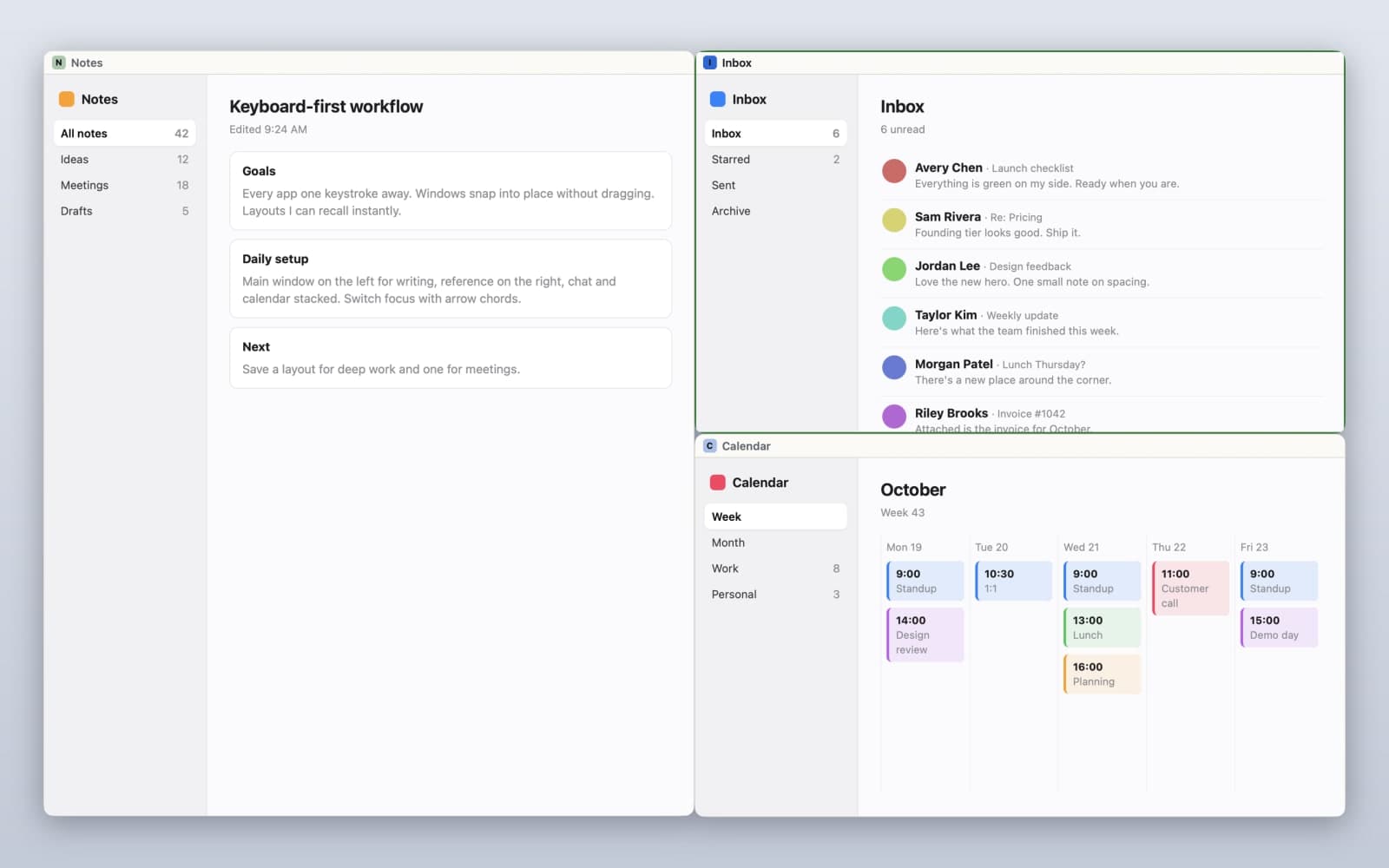
Beyond just creating apps from websites, Tilemode enhances window management with keyboard tiling features. You can snap windows into various configurations—halves, thirds, or even custom layouts—using simple keyboard shortcuts. This means less time dragging windows around and more time focused on your tasks.
Furthermore, for those who work with AI coding assistants, Tilemode can teach these assistants its commands, allowing you to set up your workspace without lifting a finger. This innovative approach keeps your Mac organized and tailored to your specific needs.
The Problem Tilemode Solves
Many Mac users face a common problem: too many applications and browser tabs lead to a cluttered workspace. This disorganization not only slows down productivity but also increases cognitive load as you scramble to find the right tool or website.
When you rely on multiple web applications, such as email, project management tools, and communication platforms, it can be challenging to keep everything at your fingertips. You might waste valuable time searching through your browser tabs or minimizing windows to locate the app you need. The frustration can be overwhelming, especially during critical work moments.
Tilemode addresses these pain points by converting your frequently used websites into dedicated applications. This ensures that you have separate logins for each app, preventing the confusion of mixed credentials. By organizing your digital landscape, Tilemode allows you to focus on your work instead of wasting time navigating through clutter.
How Tilemode Works
Using Tilemode is straightforward, and its setup is designed for efficiency. Here’s a step-by-step guide on how to get started:
- Download and Install: Visit Tilemode and download the application. Installation is quick and easy.
- Create Your Apps: Open Tilemode and start converting websites into standalone apps. You’ll simply input the URL, assign an app name, and select a hotkey.
- Customize Hotkeys: Assign global hotkeys for each app. This allows you to launch or focus on any app with a simple key combination.
- Set Up Window Tiling: Use the keyboard tiling feature to snap windows into your desired layout. Hold down the designated keys and press the corresponding number to tile the windows.
- Teach Your AI Assistant: If you use an AI coding assistant, teach it the Tilemode commands. For example, you can instruct it to create an app and tile it with a single voice command.
- Organize Your Workspace: Arrange your apps and windows according to your workflow needs, saving specific layouts for quick recall.
- Enjoy Enhanced Productivity: With everything set up, enjoy a more organized and efficient Mac experience, allowing you to focus on what matters most.
Key Features of Tilemode
- Transform Websites into Apps: Easily convert any website into a dedicated Mac app, complete with its own icon and window.
- Global Hotkeys: Assign hotkeys to launch, focus, or cycle through your applications, making access instantaneous.
- Keyboard Tiling: Snap windows into various configurations using keyboard shortcuts, streamlining your workspace.
- AI Integration: Teach your existing AI coding assistant to manage Tilemode commands, simplifying setup and usage.
- Custom Layouts: Save and recall window layouts with a keystroke, allowing for quick adjustments and organization.
These features collectively enhance the user experience by minimizing the time spent managing your digital workspace and maximizing the time spent on actual work. Whether you're a developer juggling multiple code editors or a writer managing various research tools, Tilemode can significantly enhance your productivity.
Who Tilemode is For
Tilemode is designed for Mac users who prioritize efficiency and organization in their work. Its target audience includes:
- Developers: Those who rely on multiple coding tools and web applications can benefit from the ability to create customized app shortcuts and layouts.
- Writers: Writers who manage research, drafts, and communication tools will appreciate having dedicated apps for each resource at their fingertips.
- Professionals: Anyone who juggles numerous web-based tools—such as project managers, marketers, or designers—will find value in Tilemode’s organizational capabilities.
By catering to these specific personas, Tilemode ensures that users can tailor their Mac experience to their unique workflows, ultimately enhancing productivity and reducing stress.
Tilemode vs. Alternatives
While Tilemode offers a unique approach to managing applications and web tools on a Mac, it’s essential to understand how it stacks up against alternatives like Rectangle, Magnet, and Raycast.
- Rectangle: Focused primarily on window management, Rectangle excels in tiling windows but lacks the functionality to turn websites into dedicated apps. Users looking for a comprehensive solution that includes app creation might find Tilemode more appealing.
- Magnet: Similar to Rectangle, Magnet specializes in window snapping and tiling. However, it does not offer the same level of customization or the ability to assign global hotkeys for launching web apps. Tilemode provides a more integrated experience for users who work extensively with web applications.
- Raycast: While Raycast is an impressive launcher and productivity tool, it does not provide the same desktop app functionality for web tools that Tilemode does. Users seeking a keyboard-first workflow will find Tilemode’s dedicated app features more beneficial.
Overall, Tilemode stands out by combining the best features of window management, app creation, and keyboard shortcuts, making it a versatile tool for anyone looking to optimize their Mac experience.
Real-World Use Cases
Tilemode can be applied in various real-world scenarios, enhancing productivity across different professions:
- A Developer's Workflow: A software developer uses Tilemode to create dedicated apps for their coding platforms, documentation, and communication tools. With personalized hotkeys, they can switch between coding, testing, and chatting without losing focus.
- A Writer's Research: A writer transforms their research websites into separate apps, allowing them to access information quickly. They can tile their writing app and research tools side by side, facilitating a smoother writing process.
- Project Management: A project manager relies on multiple web-based tools for collaboration. By turning each tool into a dedicated app, they can easily switch contexts and manage their team's workflow without the hassle of navigating through numerous browser tabs.
- Remote Work Setup: A remote worker uses Tilemode to create a streamlined workspace, organizing their communication, task management, and documentation tools into separate apps. The hotkey functionality allows them to stay focused during meetings and work sessions.
Getting Started with Tilemode
Ready to take control of your Mac workspace? Getting started with Tilemode is easy. Visit Tilemode to download the application and begin transforming your productivity. With a one-time purchase and free updates, you’ll have access to a powerful tool that enhances your Mac experience.
FAQ
What does Tilemode do?
Tilemode keeps your Mac's windows organized and easy to get to from the keyboard. It turns any website into a Mac app, assigns global hotkeys, and allows for window tiling.
Do I have to use the terminal?
No, everything has a normal Mac UI. While there are commands for those who prefer it, you can manage everything through the application interface.
Do I need an AI API key?
No, Tilemode works fully without AI. If you use an AI coding assistant, it can learn commands from Tilemode, but the app itself does not require any AI services.
Will it conflict with my existing shortcuts?
Tilemode checks for conflicts with system shortcuts before binding and alerts you. You can also rebind anything in the configuration file.
Can I use Tilemode on multiple Macs?
Yes, you can purchase licenses for 1, 3, or 5 Macs, allowing for flexibility in your setup.
What if I want to move Tilemode to a new Mac?
You can easily deactivate Tilemode on your old Mac and activate it on your new device using your license key.
Bottom Line
Tilemode is an essential tool for any Mac user looking to streamline their digital workspace. By transforming websites into dedicated applications and providing quick access through global hotkeys, it eliminates the chaos of cluttered windows and enhances productivity. Whether you’re a developer, writer, or professional juggling multiple tasks, Tilemode can help you create a more organized and efficient working environment.
Ready to experience the power of Tilemode? Visit Tilemode today and reclaim control over your Mac workflow.