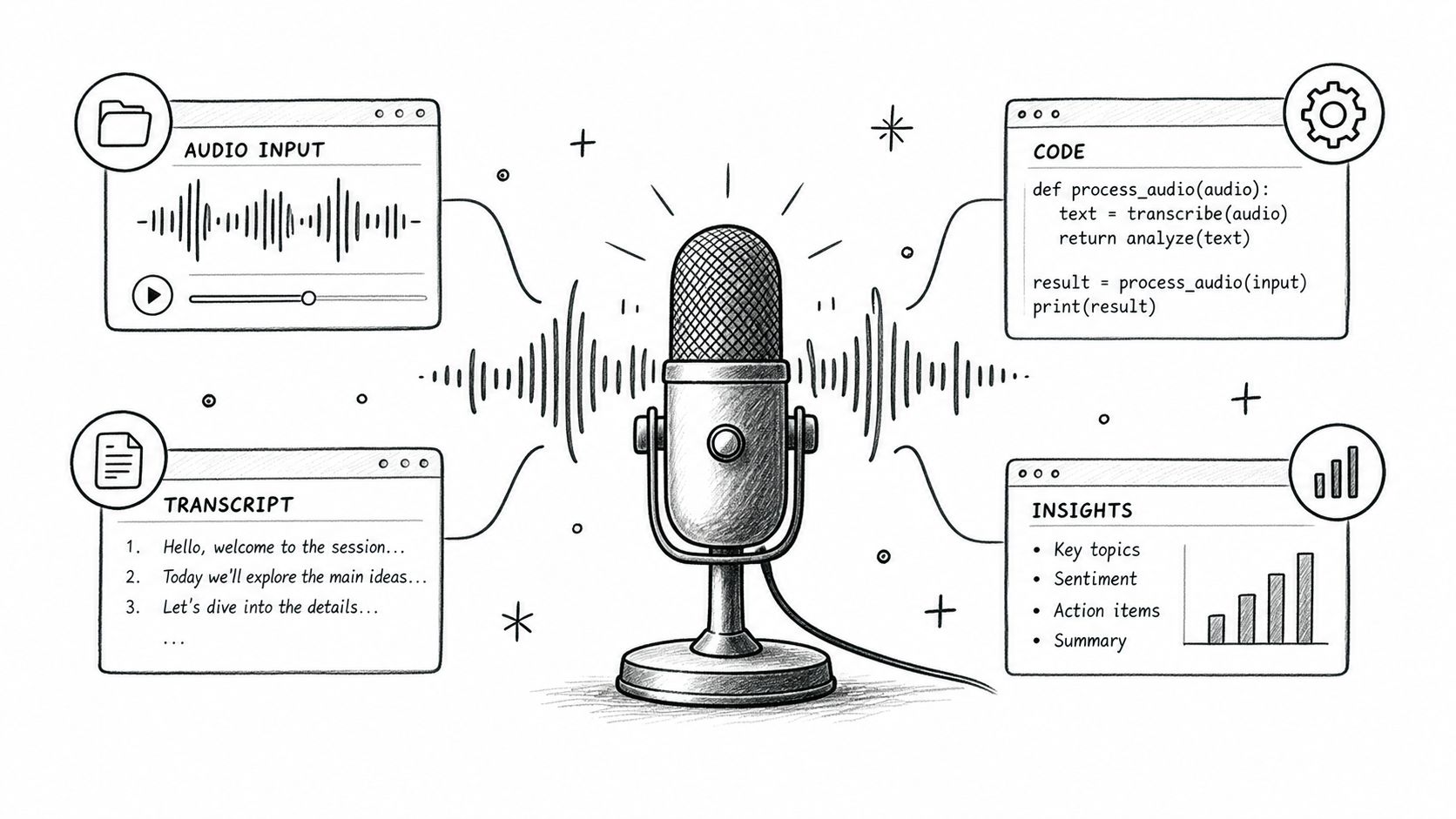
What Is a Speech-to-Text API? (Reference)
A speech-to-text API is a programmatic service that turns spoken audio — files or live streams — into structured text your application can actually use. Where a standalone recognition engine just transcribes, an API wraps that engine with authentication, rate limits, job queues, and predictable JSON responses so you don't have to build all that plumbing yourself.
Table of Contents
- Defining Speech-to-Text API Infrastructure
- Market Scale at a Glance
- Check Language and Dialect Coverage
- Measure Formatting and Speaker Separation
- Test Vocabulary Controls and Domain Fit
- Choose Streaming for Immediate Feedback
- Use Batch for Throughput and Archives
- Review Features for Production Workflows
- Improve Audio Before Uploading
- Measure Word Error Rate
- Use Confidence and Human Review
- Identify the Full Cost
- Forecast Volume and Protect Capacity
- Control Data Residency and Encryption
- Verify Compliance Evidence
- Minimize Exposure Before Transmission
- Streaming Latency and Chunk Size
- Test Failure Recovery and Edge Cases
- Speech to Text API Provider Comparison Matrix
Defining Speech-to-Text API Infrastructure
Quick answer: A speech-to-text API receives audio, runs automatic speech recognition, and returns machine-readable text — typically alongside timestamps, confidence scores, punctuation, and speaker labels.
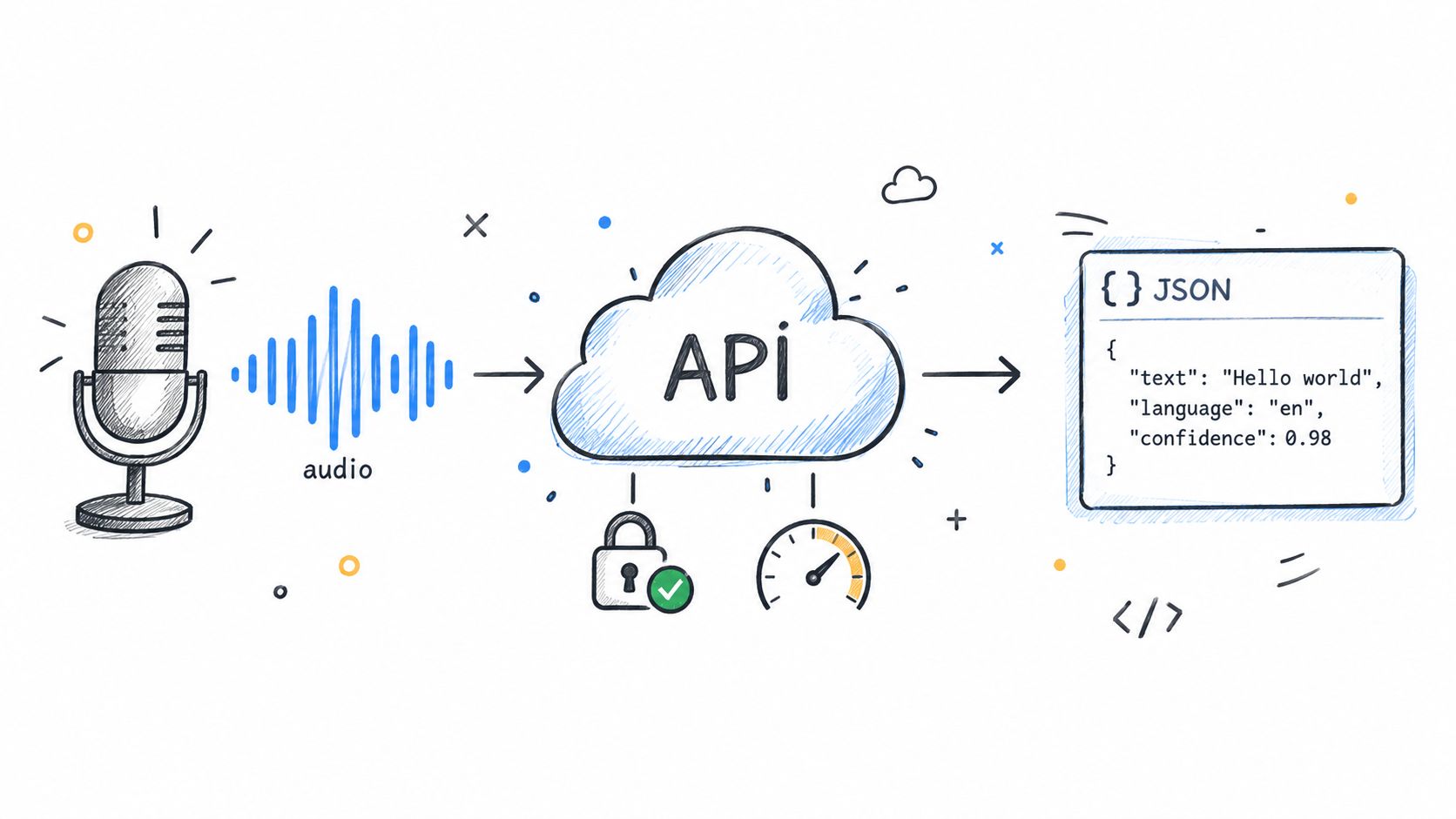
A speech recognition engine is the underlying model that identifies words in audio. An API is the production interface around it. Your application submits a recording or maintains a live connection, then receives transcription results — without running model servers, scaling compute, or writing transport logic.
Most providers support two patterns:
- Batch transcription — upload a completed file, get results asynchronously when processing finishes.
- Streaming transcription — push audio continuously, receive partial (and then final) text in near real-time.
Modern endpoints use API keys or OAuth credentials, enforce quotas, and return structured JSON containing the transcript plus metadata. That structure matters because it lets you pipe results directly into search indexes, caption files, call analytics dashboards, or downstream language model pipelines.
Market Scale at a Glance
The speech-to-text API market was valued at roughly $3.81 billion in 2024 and is projected to hit $26.38 billion by 2031, growing at a compound annual rate north of 37% depending on the analyst scope. Providers collectively process hundreds of millions of audio hours each month — Modulate's 2026 comparison notes the top-tier services handling workloads that would have been unthinkable five years ago.
Those throughput numbers explain why selection criteria extend beyond raw accuracy. Reliability, regional availability, and predictable pricing at scale often matter more than a half-point difference on a benchmark.
Speech to Text API Market Growth Metrics
| Metric | 2025 Value | 2026 Projection | 2031 Forecast | CAGR |
|---|---|---|---|---|
| Global market size (speech-to-text APIs) | ~$5.2B est. | ~$7.1B est. | $26.38B | ~37–40% range |
| Monthly audio hours processed by major providers | 500M+ | 600M+ | — | — |
These figures establish infrastructure scale, but they don't identify the right vendor for your use case. Selection still depends on audio quality, language coverage, latency budget, compliance requirements, and what you're feeding downstream. A captioning product cares about timestamps and streaming speed. A compliance archive cares about batch reliability, retention controls, and speaker diarization.
Keep this distinction in mind when reading the sections below. ASR (automatic speech recognition) describes the recognition technology. A speech-to-text API describes the complete developer service that integrates that technology into production software.
Picking a speech-to-text API begins with the messy audio your users actually create, not a clean benchmark recording. Vendors love to showcase polished demos — what matters is how their model handles the real stuff: regional accents, overlapping speakers, background chatter, and domain-specific jargon. Deepgram's API evaluation guide makes a solid case for testing production-like audio, since published Word Error Rate numbers can drift significantly from what you'll see in practice.
Check Language and Dialect Coverage
A big language count on the sales page is just the starting line. What you really need to confirm is whether the provider handles your specific dialects, code-switching between languages, automatic language detection, and regional spelling differences. Google reports support for more than 125 languages and dialects, while Deepgram's coverage shifts depending on which model you choose — so always verify at the endpoint level, not the marketing level.
Dialect accuracy has downstream effects you might not immediately connect. Customer-service search indexing, video captions, intent detection in voice agents — all of these degrade when the model hasn't been tested on the way your actual speakers talk. Run separate tests for regional accents, rapid-fire speech, and mixed-language conversations. A model that nails standard broadcast English might fall apart on local pronunciation patterns or borrowed terminology.
Measure Formatting and Speaker Separation
Here's where most evaluations stop too early. Raw transcript text isn't the end product — it's what happens next that counts. Automatic punctuation, capitalization, number formatting, timestamps, and confidence scores all determine whether the output can flow directly into your CRM, subtitle editor, or case-management workflow without someone cleaning it up by hand.
In legal transcription, a missing comma can change the meaning of a clause. In medical notes, a badly formatted drug name or dosage triggers review flags that eat up clinician time. These aren't edge cases; they're the whole job.
Speaker diarization deserves the same scrutiny when your recordings involve multiple voices. Find out whether speaker labels work in real time, in batch processing, or only when you've got separate audio channels per speaker. For contact centers, accurate attribution is the foundation of coaching programs and compliance audits. Weak diarization — attaching a customer's complaint to an agent who didn't handle the call — creates more problems than no diarization at all.
Evaluation rule: Push for a measurable error-review process, not a glossy headline accuracy number.
Test Vocabulary Controls and Domain Fit
Customization features vary wildly across providers. Some let you submit simple phrase hints; others support phonetic spellings, pronunciation metadata, or fully trained domain-specific models. Before committing, test the exact terms that trip up general models: company names, product SKUs, legal terminology, medication names, abbreviations, and the misspellings your industry is prone to.
Healthcare buyers tend to lean toward purpose-built medical models. Legal teams often get more mileage out of a strong general model with robust vocabulary injection and precise timestamps. The trade-off is real — vertical models can squeeze out better terminology accuracy, but they frequently support fewer languages or narrower audio format options compared to their general-purpose counterparts.
Use this checklist before you integrate:
- Document required languages, dialects, and switching patterns.
- Run identical files through each vendor's punctuation and diarization pipeline.
- Score terminology errors by business impact, not just Word Error Rate.
- Confirm customization limits, how updates are applied, and what fees attach.
- Set human-review thresholds for transcripts that carry legal, medical, or contractual consequences.
For additional practical transcription guidance, explore this transcription resource. Then weigh each capability against the stakes of your application. A slightly off caption in a product demo? Probably fine. A misinterpreted legal clause, patient instruction, or customer commitment? That's a completely different risk profile — one that demands specialized models, tighter validation, or mandatory human approval before anything goes live.
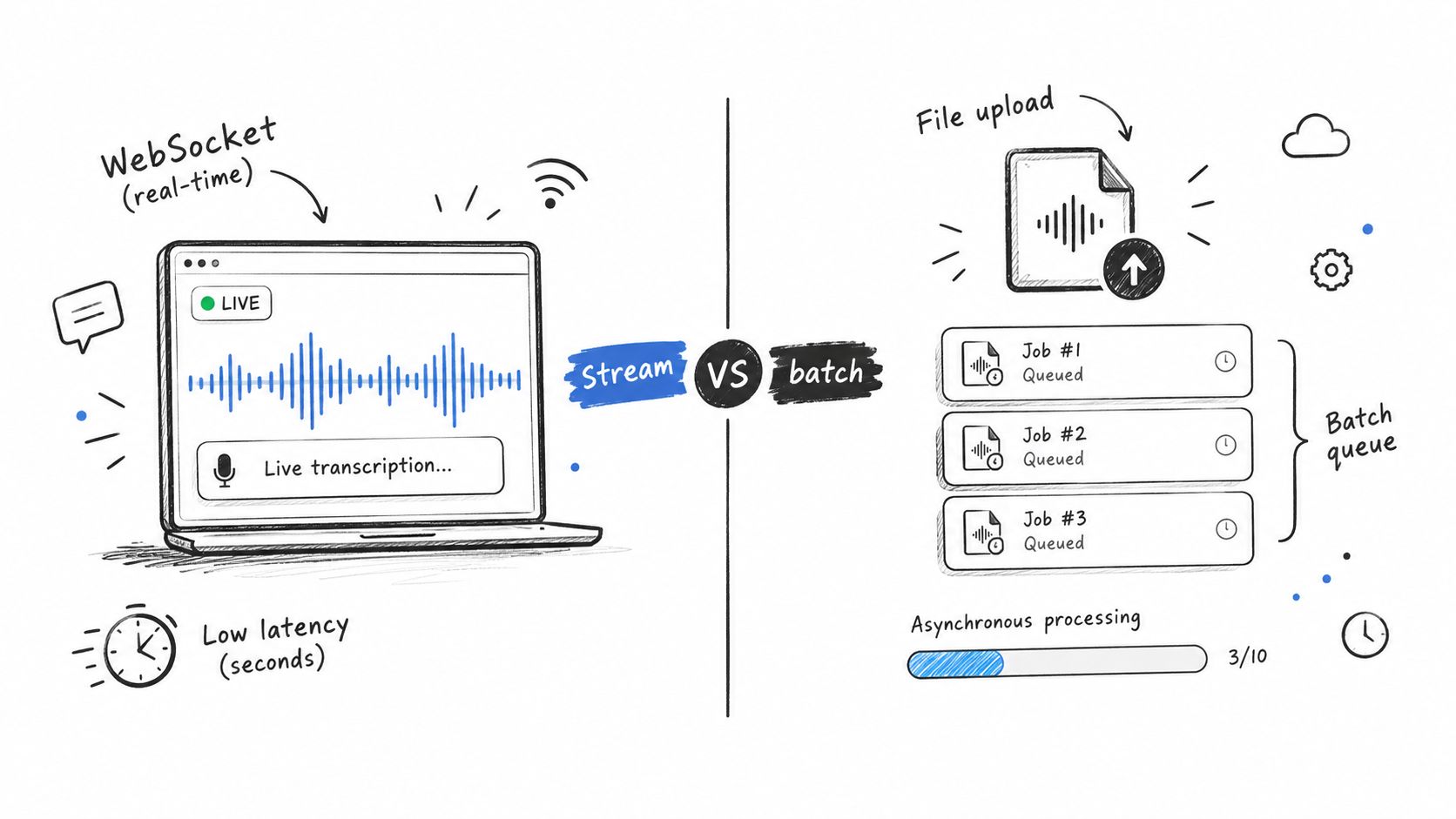
A speech-to-text API typically gives you two ways to process audio. Streaming pushes audio over a persistent WebSocket connection and fires back partial transcripts as you go, then finalizes each segment when the speaker pauses. Batch takes a finished audio file through a standard REST call, queues it as an asynchronous job, and delivers the full result once processing completes. The right choice depends on what you are actually building.
Choose Streaming for Immediate Feedback
Reach for streaming when your users need to see or react to words in real time. Live captions, voice assistants, accessibility overlays, and agent coaching tools all depend on latency measured in milliseconds rather than minutes. Top providers report sub-second performance, though your actual numbers will vary based on network conditions, model selection, and configuration - Deepgram's comparison guide covers these variables in detail.
The pattern most teams follow:
- Authenticate and open a WebSocket.
- Push properly encoded audio chunks as they arrive.
- Handle interim transcript events to keep the interface responsive.
- Lock in final events and close the connection cleanly.
Keep sessions bounded by a sensible maximum length and watch for silence timeouts, dropped connections, and server-side error codes. When a socket dies, reconnect with exponential backoff - but do not naively replay the audio stream. Track sequence numbers or use a short overlap window so recovery does not duplicate words in the transcript.
Streaming rule: Optimize for perceived responsiveness first, then reconcile interim text against final segments before writing anything to permanent storage.
Use Batch for Throughput and Archives
Batch processing is the right fit for podcasts, interviews, meeting recordings, call center archives, and compliance workflows. You upload the file, store the job identifier, poll for completion or wait for a webhook, then pull down structured JSON with the transcript, word-level timestamps, confidence scores, and optional speaker labels.
Batch sidesteps the overhead of holding thousands of concurrent connections and usually costs less for offline workloads. Retries are simpler too - each file is a discrete, self-contained job. A media team, for example, can queue 500 interviews overnight, retry only the handful that failed, and have searchable transcripts ready by morning.
| Requirement | Recommended endpoint |
|---|---|
| Live captions | Streaming |
| Voice assistant response | Streaming |
| Long recordings | Batch |
| Large overnight queue | Batch |
| Live preview plus permanent transcript | Hybrid |
The decision comes down to interactivity, duration, throughput, and how much delay your use case can tolerate. Many production systems use both: stream a meeting for live notes, then send the original recording through batch for cleaner diarization, precise timestamps, and archival output. Treat the batch transcript as the source of truth and keep streaming events for the UI layer only.
Before you ship anything, test reconnect behavior, rate limits, maximum stream duration, file-size caps, and the separate pricing tiers for streaming versus batch. Provider documentation changes frequently, so verify current limits directly and benchmark both paths against your own audio samples.
{"text":"Welcome to the meeting.","segments":[{"start":0.0,"end":2.1,"text":"Welcome to the meeting."}]}
WhisperAI.com is a professional speech-to-text API platform powered by OpenAI's Whisper model. It handles the heavy lifting—transcribing recorded or live audio into structured text across 100+ languages—so teams don't have to wrangle model infrastructure, servers, or tedious file-splitting workflows.
For more details, check out the speech-to-text API options covering batch files, real-time streams, translation, and developer integrations.
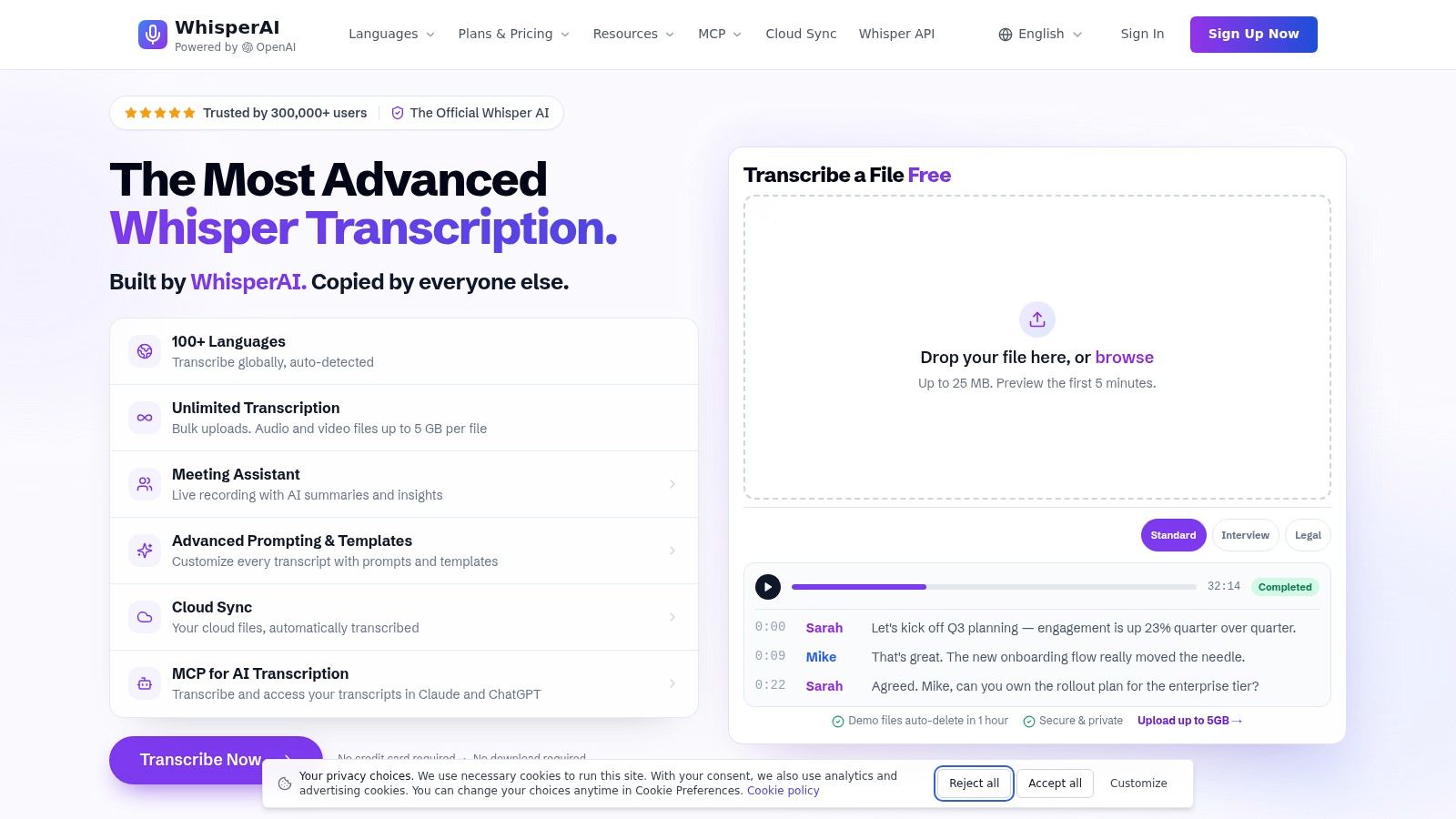
The screenshot shows a browser-based transcription workspace where you upload recordings, review the generated text, and push results into downstream content workflows. It's a practical, all-in-one alternative to cobbling together separate tools for transcription, editing, speaker labeling, and subtitles.
Review Features for Production Workflows
Browser uploads accept audio and video files up to 5 GB per file, which comes in handy for conferences, interviews, lectures, and marathon meetings. Bulk uploads, reusable defaults, and Drive-based workflows also help teams keep recurring content consistent.
For live scenarios, the meeting assistant delivers real-time transcription, summaries, and action items. Automatic language detection covers speech in over 100 languages, with optional translation for multilingual teams and international media workflows.
Advanced prompts let you tailor output for specific contexts:
- Verbatim preserves spoken wording and disfluencies.
- Legal, medical, financial, and technical presets tune recognition toward specialized terminology.
- Custom vocabulary handles names, acronyms, products, and domain-specific phrases.
- Per-file instructions give reviewers control over formatting and recognition priorities.
Word-level and sentence-level timestamps make transcripts easier to search, edit, and sync back to recordings. Speaker diarization labels each speaker in multi-person sessions, while exports to PDF, DOCX, TXT, and SRT cover documentation, publishing, and caption production.
Practical takeaway: Pro and higher plans include unlimited transcription, which removes per-minute overage headaches. Encrypted processing, GDPR-aligned handling, and deletable data keep sensitive business content protected.
For developers, both real-time and pre-recorded APIs provide a clear path from browser testing to full application integration—no need to spin up a separate transcription stack for every workflow.
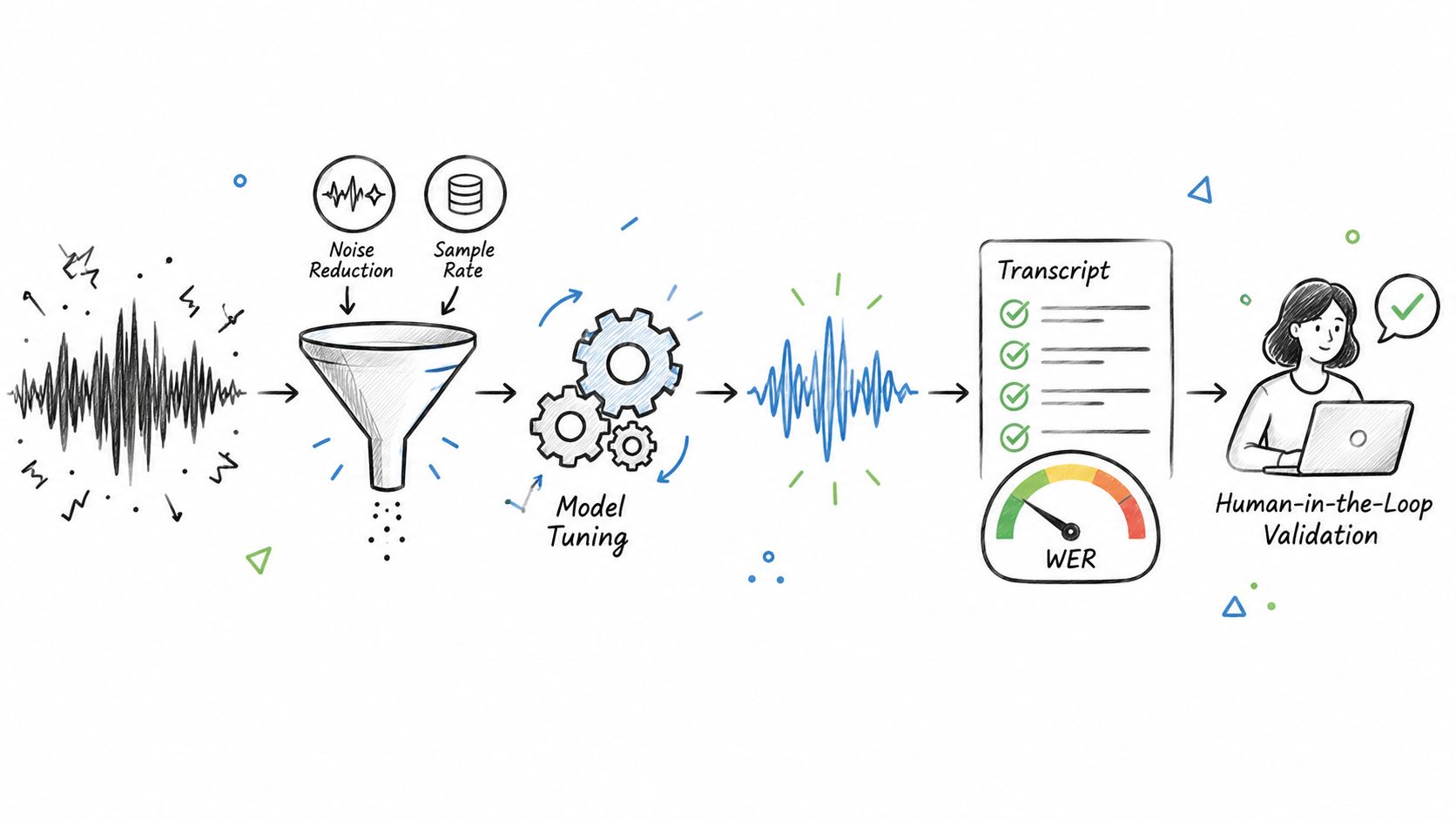
A speech-to-text API is only as accurate as the complete pipeline around it. Microphone quality, room noise, encoding, model settings, and post-processing can affect results as much as the provider itself. Real-world recordings with accents, cross-talk, and jargon often perform differently from clean vendor demonstrations, as Deepgram's evaluation guidance explains.
Improve Audio Before Uploading
Start with the recording, not the endpoint. Apply moderate noise reduction, remove long silences when appropriate, and preserve speech frequencies. Excessive filtering can erase consonants and create more recognition errors.
Use a sample rate supported by your selected model, avoid unnecessary transcoding, and separate channels when each speaker has an individual track. Channel separation is often more dependable than diarization because the API does not need to infer speaker changes from one mixed waveform.
- Test microphone placement and gain before deployment.
- Prefer lossless or high-quality codecs for critical recordings.
- Keep preprocessing identical across competing providers.
Key insight: Accuracy is a system property, not a model score.
Measure Word Error Rate
Word Error Rate, or WER, compares the generated transcript with a human-verified reference:
WER = (substitutions + deletions + insertions) / reference words
A 5% WER means five word-level errors per 100 reference words, although the business impact depends on which words are wrong. A medication name, account number, or contract term matters more than a harmless filler-word omission. Modulate's comparison also emphasizes testing noisy, multi-speaker audio rather than relying on generic claims.
Build a domain-specific holdout set containing typical accents, environments, durations, and terminology. Compare providers using identical files, then report WER by category instead of one blended average.
Use Confidence and Human Review
Confidence scores help prioritize inspection, but they are not guarantees of correctness. Calibrate thresholds against your own labeled data, because a score that works for studio audio may fail in phone recordings.
For high-stakes workflows, route low-confidence segments and sensitive terms to reviewers. Store corrections, measure recurring errors, update custom vocabulary, and rerun the benchmark after each configuration change. This feedback loop turns transcription quality into an operational process rather than a one-time vendor decision.
Pricing can look straightforward until a speech-to-text API hits real production volume. Most providers bill per minute, per second, or per token, and enterprise tiers often layer in commitments and negotiated discounts on top. Published rates hover between $0.006 and $0.024 per minute, but those numbers only mean something when you compare the same model class, endpoints, and included features. Deepgram's 2026 comparison does a good job showing how batch and streaming pricing can diverge sharply for essentially the same output.
Identify the Full Cost
Transcription time is just the starting point. Before committing, audit the invoice for these additions:
- Minimum billing units — Amazon Transcribe, for example, applies a 60-second minimum per request, so a 10-second clip still costs you for a full minute.
- Premium feature surcharges — diarization, live translation, PII redaction, custom vocabulary, and analytics each carry their own line items on many platforms.
- Storage, webhook delivery, and egress fees — pulling large transcript archives out of cloud storage adds up quietly.
- Overage penalties and tier jumps — some plans silently shift you into a higher rate once a threshold is crossed.
- Monthly minimums — those commitments don't pause during your slow season.
Say a team processes 100,000 minutes per month at $0.005/min. That's a $500 base bill. But once you add streaming, diarization, storage, and a couple premium language models, the real number can hit $1,000 — effectively $0.01 per minute. The headline rate told a very different story.
Budget rule: Always compare effective cost per completed transcript, not the advertised per-minute rate.
Forecast Volume and Protect Capacity
Build three scenarios before anything goes live:
- Baseline — expected monthly audio minutes with current feature settings.
- Growth — increased user count, call volume, or recording cadence over the next two quarters.
- Stress — campaign spikes, retry logic firing, and peak concurrent streams hitting at once.
Keep separate tallies for batch minutes, streaming minutes, API requests, and simultaneous connections. Rate limits and concurrent-stream caps will throttle you even when your account still shows available credits. Queue batch workloads, implement exponential backoff for throttling responses, and set alerts at 70%, 85%, and 100% of each monthly quota.
For spiky or unpredictable traffic, reserve dedicated capacity only for latency-sensitive real-time streams. Everything else goes into a queue. And revisit your forecast whenever you change language packs, toggle diarization, or adjust retention policies — each of those shifts the cost curve.
Before signing an enterprise agreement, get written confirmation on overage rates, cancellation terms, regional pricing differences, how quota increases work, and what level of support is actually included. Then run a one-month pilot with production-grade audio and compare the real invoice to your forecast. That single step catches hidden charges before switching becomes painful.
Sensitive recordings often carry a lot of baggage — health details, payment info, personal identifiers, things people assume stay private. Before routing any audio through a speech-to-text API, take a careful look at where recordings actually travel: transcripts, logs, backups, temporary files, all of it.
Control Data Residency and Encryption
First, make sure the provider processes and stores data in the region you need, and that nothing silently shifts to another jurisdiction for "support" or "model improvement." For healthcare, finance, or government contracts, this alone can be a dealbreaker.
At minimum, insist on:
- TLS encryption in transit — uploads, downloads, streaming, everything.
- Encryption at rest — audio, transcripts, queues, backups.
- Customer-managed keys if your internal policies require that level of control.
- Clear, written retention policies for both source audio and generated transcripts.
One more thing worth checking: whether your audio is being used to train shared models. If that's on the table, turn it off. And get confirmation in writing, not just a checkbox somewhere in a settings panel.
Security principle: Think of the API as one service in a larger data pipeline, not as the whole security model.
Verify Compliance Evidence
Compliance claims need to match your actual workload, your region, and your contract. HIPAA deployments mean you need a provider willing to sign a Business Associate Agreement with proper safeguards in place. SOC 2 reports are useful for evaluating operational controls — but they don't make your application compliant by themselves. Government workloads often require FedRAMP authorization at the right impact level, not just a general certificate.
Ask for current documentation covering:
- Independent audit reports and what they actually cover.
- Subprocessors and where they process data.
- Incident notification timelines — how fast you're told if something goes wrong.
- Data deletion guarantees, including how backups are erased.
- Audit logs for authentication, access changes, config changes, and export events.
Minimize Exposure Before Transmission
Security is a shared responsibility. The vendor protects the platform; your team handles credentials, permissions, retention, and how audio reaches the system in the first place.
Use short-lived credentials, role-based access, separate dev and prod projects, and rotate keys immediately when something changes. Where it makes sense, redact or segment audio before uploading, strip unnecessary metadata, encrypt local temporary files, and delete source audio once processing is confirmed. And keep a record of consent and retention decisions alongside each transcription job — that way, when auditors come knocking, policy and evidence actually line up.
Common Pitfalls and Best Practices for Speech-to-text API Integration
Most speech-to-text API failures don't start with the model itself. They start with assumptions about audio formats, timing, or how to handle things when they go sideways. A provider might advertise support for WAV, MP3, or WebSocket streams, but your specific codec, sample rate, channel count, or MIME type can still quietly violate endpoint requirements.
Before going live, test against:
- Audio compatibility across every recording source your users actually have — not just your studio headset.
- Chunk duration and byte size relative to the provider's streaming limits.
- Final-event handling, so intermediate transcriptions don't get stored as permanent output.
- Credential rotation, including what happens when a key expires or gets revoked mid-session.
Production lesson: Test with the exact audio pipeline your users generate, not just clean microphone samples from a quiet room.
Streaming Latency and Chunk Size
Streaming integrations tend to break at the chunk layer. Too large, and you get visible lag that users notice. Too small, and you're burning overhead on connection instability and excessive requests. Neither is cheap.
Measure the full end-to-end pipeline: capture, network transfer, API processing, rendering, and whatever happens downstream. Set a hard latency budget for each stage. When captions consistently exceed that budget, the product feels broken to users — even if the transcription technically completes successfully seconds later.
Test Failure Recovery and Edge Cases
Treat errors as normal events, not exceptions. Retry transient timeouts and rate limits with exponential backoff, but don't let the system loop forever on genuinely malformed audio. That just burns quota and hides the real problem.
Store job IDs, sequence numbers, request metadata, and provider error codes. Your support team needs these to reconstruct what went wrong without logging or replaying sensitive audio.
Build test coverage for:
- Silence, clipping, background music, cross-talk, accents, and fast speech.
- Duplicate events, dropped sockets, partial uploads, and truncated files.
- Quota exhaustion, provider outages, webhook delays, and malformed responses.
In production, aggregate structured logs and watch error rate, queue age, reconnect frequency, and p95 latency. Set alerts at reasonable thresholds — 5% error rate, latency breaching the user-facing budget for five minutes, quota hitting 70% and again at 85%. Keep the previous model version and configuration accessible for rollback. Drain incoming jobs, preserve failed inputs securely, and replay them once the issue is resolved.
That discipline protects transcript integrity and, more importantly, the trust users place in your product.
Use this matrix to shortlist a speech-to-text API based on what actually matters for your project — not just whatever WER number looks best in a headline. Published benchmarks shift depending on the dataset, audio quality, model version, and endpoint, so confirm specs directly with each provider before you commit.
Speech to Text API Provider Comparison Matrix
| Provider | Accuracy Benchmark | Streaming Latency | Languages Supported | Pricing Model | Compliance Certs |
|---|---|---|---|---|---|
| Deepgram | Nova-3 reports 5.26% WER | Sub-300ms claims in optimal conditions | 48 on Nova-3 | Usage-based | Enterprise options |
| Google Cloud | Chirp evaluation tools available | Configuration-dependent | 100+ | Usage-based | Google Cloud controls |
| OpenAI Whisper | Strong general accuracy | Batch native; realtime requires separate service | 50+ | Per minute | Verify deployment |
| AssemblyAI | 10.7% WER reported | Real-time and batch | Six streaming languages | Usage-based add-ons | Verify current scope |
| Azure Speech | Results vary by audio and domain | Near real time | 140+ | Tiered usage | Enterprise certifications |
| Amazon Transcribe | Domain models available | Near real time | 100+ | Tiered, request minimums | HIPAA-eligible options |
| Speechmatics | Strong multilingual performance | Usually sub-second | 55+ | Usage-based | Cloud and on-premise options |
| IBM Watson | Custom model support | Often under one second | Multiple languages | Tiered contracts | On-premise options |
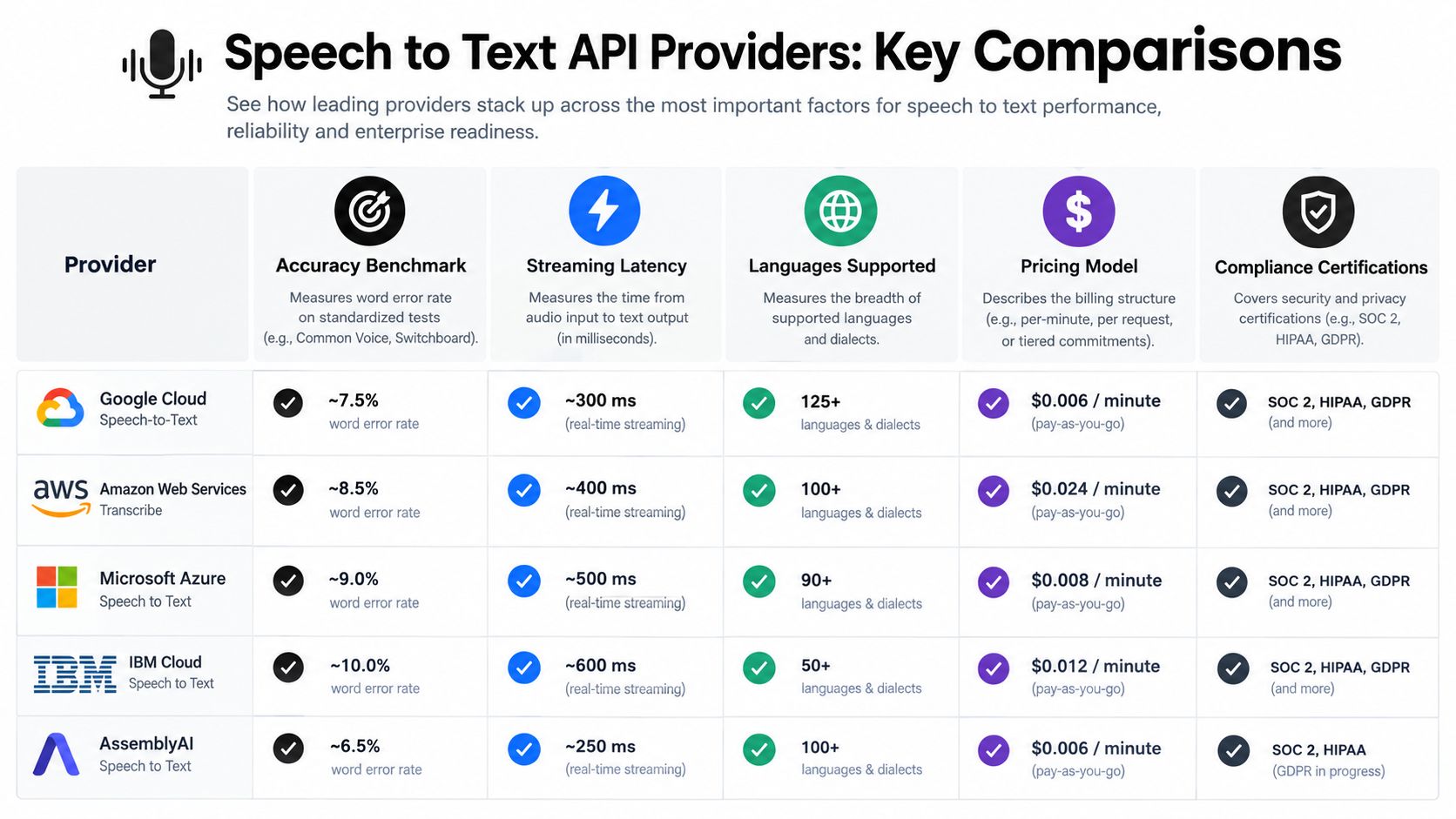
The big picture is straightforward: Google Cloud and Azure Speech lead on language coverage, Deepgram leans hard into low-latency conversational audio, and Speechmatics and IBM Watson are the go-to options when you need on-premise or private-cloud deployment.
Match Vendors to Your Requirements
- Pick Deepgram for low-latency voice agents, custom deployment scenarios, and noisy real-world conversations.
- Pick Google Cloud, Azure, or Amazon when existing cloud integrations and enterprise access controls cut down on engineering time.
- Pick Whisper when self-hosting, broad language support, or open-model control matters more than built-in diarization features.
- Pick AssemblyAI when transcript formatting and speech-intelligence add-ons are central to your workflow.
- Pick Speechmatics or IBM Watson for on-premise, private-cloud, or regulated-environment deployments.
A practical note: capabilities and pricing in this space move fast. Run identical production-like samples through your shortlist, measure WER and end-to-end latency yourself, then verify current limits, certifications, SDK availability, and contract terms before signing anything.
For video-specific workflows, look into AI video captioning and transcription tools.
What Audio Quality Does a Speech to Text API Need?
Stick with clean, stable recordings captured from a decent microphone. Most providers handle common formats like WAV and MP3 without trouble, but double-check the codec, sample rate, channel layout, and MIME type before you wire anything up — a quick read through audio preprocessing guidance pays off here.
Background noise alone rarely derails things. What actually hurts accuracy is heavy cross-talk, distant mics, and multiple people talking over each other. Before you commit to a model, test it against recordings that sound like your actual production data, not a quiet demo clip.
Can It Separate Speakers on One Channel?
Yes, if the provider offers speaker diarization. The API parses the waveform and guesses when one speaker hands off to another, so expect accuracy to dip when voices overlap or sound alike. Single-channel diarization is a best-effort estimate, not a guarantee.
For meeting-style audio, you'll get better results by assigning each participant to their own channel when possible — that sidesteps the guessing game entirely. When diarization is what you've got, request per-speaker timestamps and confidence scores in your pilot, then validate a sample manually. The diarization checklist earlier in this guide walks through evaluation criteria worth using.
Is Cloud or On-Premise Deployment Better?
Cloud is the path of least resistance — minimal infrastructure, instant scaling, and someone else handles the uptime. The tradeoff is that audio files leave your environment, which can be a dealbreaker depending on your compliance posture.
On-premise or private cloud flips that equation. You keep data residency and control, which matters for regulated industries, but your team owns the hardware, patching, capacity planning, and monitoring. Speechmatics and similar providers publish flexible deployment options worth comparing.
Don't make this decision on privacy alone. Stack up compliance requirements, latency sensitivity, available ops staff, and total cost of ownership over a realistic timeframe — then choose.
How Can High-Volume Teams Reduce Costs?
Forecast your volume honestly and compare the effective cost per completed transcript, not the headline per-minute rate. Use batch processing for archived audio that doesn't need real-time feedback, reserve streaming for live experiences, and ask about volume discounts once you have real numbers to share.
There are a few practical levers that add up fast:
- Batch short clips into single requests where the API supports it
- Disable add-ons you aren't actually using (custom vocabulary, redaction, etc.)
- Cache transcripts for repeated content
- Set quota alerts to catch runaway usage early
Run a pilot with a month's worth of real audio before going live. That exercise exposes minimum billing units, premium feature pricing, retry charges, and storage costs — all the line items that don't show up on the pricing page.