The Subscription Management Dilemma
In today's digital world, managing multiple subscriptions has become a significant challenge for many individuals. From streaming services like Netflix and Spotify to productivity tools like Notion and GitHub, it’s easy to lose track of what you are paying for monthly or yearly. Many people find themselves surprised at the end of the month when they see their bank statements, often forgetting about subscriptions they no longer use or need. This can lead to unnecessary overspending, budget mismanagement, and subscription fatigue.
Enter Track My Subscriptions, a user-friendly tool designed to help you regain control over your subscription expenses. With its intuitive interface and powerful features, Track My Subscriptions enables users to keep track of their subscription costs without the hassle of linking bank accounts or dealing with complicated setups. Whether you are a casual user or someone with a stack of subscriptions, this tool provides a clear overview of your financial commitments.
What is Track My Subscriptions?
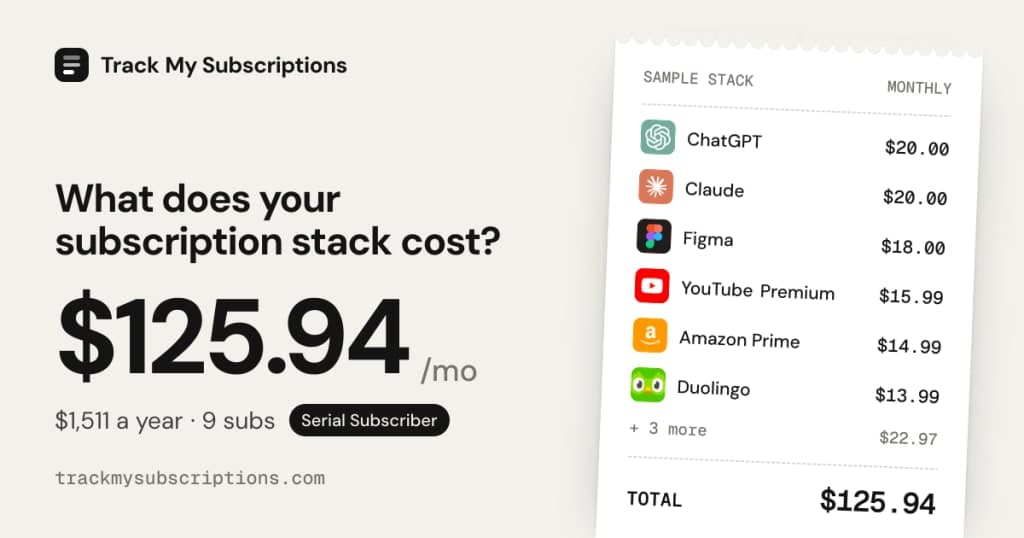
Track My Subscriptions is a free online tool that allows users to manage their subscription services efficiently. It offers users the ability to select from over 200 popular services, such as Netflix, Spotify, and ChatGPT, and easily calculate their total monthly and yearly spending. The platform does not require you to link your bank account, which adds a layer of security and ease of use. Users simply choose their subscriptions, and the tool calculates the total costs instantly.
Additionally, Track My Subscriptions offers a Pro version that enhances the user experience with features like bank statement imports, renewal reminders, and a savings finder. This way, you can avoid unexpected charges and keep a closer eye on your budget. By allowing you to publish your subscription stack, the platform also enables easy sharing and tracking of your expenses.
The Problem Track My Subscriptions Solves
Many people face a common problem: they forget about the subscriptions they pay for. This results in unexpected charges that can throw budgets off balance. For instance, an individual might sign up for a free trial of a streaming service and forget to cancel it before the trial period ends, leading to an unwanted monthly expense.
Track My Subscriptions addresses this pain point by providing a simple and effective way to visualize all your subscriptions. Users can see exactly what they are spending and on which services, thus making informed decisions about their subscriptions. The tool aims to reduce the financial stress associated with managing multiple subscription services.
How Track My Subscriptions Works
Using Track My Subscriptions is straightforward. Here’s a step-by-step guide to getting started:
- Visit the Website: Go to Track My Subscriptions.
- Select Your Services: Browse through the extensive list of over 200 subscription services and select the ones you currently use.
- Input Payment Details: For each subscription, input the payment amount. The tool will automatically calculate your total monthly and yearly expenses.
- Analyze Your Spending: Once you've selected all your subscriptions, you can view your total costs at a glance.
- Manage Renewals: If you opt for the Pro version, you can set up renewal reminders to alert you before charges occur.
- Explore Additional Features: Utilize features like bank statement imports and savings finders to optimize your subscription management.
- Share Your Stack: Publish your subscription stack for easy tracking and sharing with others.
This simple workflow not only saves time but also helps users stay organized and informed about their expenses.
Key Features of Track My Subscriptions
- Comprehensive Service Selection: Choose from over 200 popular services, ensuring you can track nearly all your subscriptions.
- Total Cost Calculation: Instantly see your monthly and yearly subscription totals without linking a bank account.
- Pro Version Features:
- Bank Statement Import: Upload your bank statement to identify all your recurring charges.
- Renewal Reminders: Get alerts before your subscriptions renew, preventing unexpected charges.
- Savings Finder: Discover cheaper plans and potential savings on overlapping services.
These features empower users to take control of their finances by making subscription management simple and accessible. With Track My Subscriptions, you can easily understand your spending habits and make adjustments where necessary.
Who Track My Subscriptions is For
Track My Subscriptions is designed for individuals who manage multiple subscriptions and want to keep their budgets in check. Here are some concrete user personas that can benefit from this tool:
- Casual Users: Individuals who subscribe to a few services, such as Netflix or Spotify, and want a clear view of their spending without the need for bank linking.
- Budget-Conscious Consumers: People who are trying to save money and need to track their subscriptions to eliminate unnecessary expenses.
- Families: Households that subscribe to multiple services for entertainment, education, and productivity, and want to ensure they are not overspending.
- Tech-Savvy Users: Those who are comfortable leveraging tools and technology to manage their finances efficiently and prefer a straightforward solution without ads.
Track My Subscriptions vs Alternatives
When comparing Track My Subscriptions with alternatives like Truebill, Trim, and Bobby, several key differences stand out:
- Privacy and Security: Unlike some competitors that require bank linking, Track My Subscriptions does not necessitate sharing your financial information, making it a more secure option for privacy-conscious users.
- Cost Structure: The base functionality of Track My Subscriptions remains free, whereas some competitors may charge for basic features upfront.
- User Interface: Track My Subscriptions offers a clean and simple interface that is easy to navigate, which can be appealing to users who prefer minimalism in financial tools.
- Feature Set: While services like Truebill offer additional features such as automated cancellation of subscriptions, Track My Subscriptions focuses on providing a straightforward calculation tool without the complexity of additional services.
Choosing the right tool ultimately depends on individual needs. For users who want a simple, no-frills way to track subscriptions without linking bank accounts, Track My Subscriptions is an excellent choice.
Real-World Use Cases
- Managing Streaming Services: A user can select their streaming subscriptions (like Netflix and Hulu) to see their total monthly spending on entertainment, which can help them decide whether to keep or cancel certain services.
- Family Budgeting: A family can input all their subscriptions for educational services and entertainment to get a clearer picture of their monthly expenses, allowing them to allocate budget more effectively.
- Trial Management: An individual uses the renewal reminder feature to keep track of free trials and avoid surprise charges when they convert to paid subscriptions.
- Savings Optimization: A user checks the savings finder feature to discover cheaper alternatives for overlapping services, potentially saving money on their subscription stack.
- Expense Sharing: A group of friends can publish their subscription stack to divide costs on services like streaming platforms, making it easier to manage shared subscriptions.
Getting Started with Track My Subscriptions
Ready to take control of your subscription expenses? Getting started is easy. Simply visit Track My Subscriptions and begin selecting the services you pay for. You’ll quickly gain insights into your spending and can start making informed decisions regarding your subscriptions.
FAQ
Is Track My Subscriptions free?
Yes, Track My Subscriptions is free to use, and it does not require bank linking.
How do I calculate my total subscription cost?
You can calculate your total subscription cost by selecting each service you use and inputting the payment amount. The tool will add them up for you.
Can it find subscriptions in my bank statement?
Yes, with the Pro version, you can upload bank statements to automatically identify all your recurring charges.
What does the Pro version add?
The Pro version includes features such as statement import, renewal reminders, savings finder, and alerts for price increases.
How does Track My Subscriptions ensure my data is safe?
The platform does not require bank linking, ensuring your financial data remains private and secure.
Can I share my subscription stack with others?
Yes, you can publish your subscription stack for easy sharing and tracking.
Bottom Line
Track My Subscriptions is an invaluable tool for anyone looking to simplify and manage their subscription services. Its straightforward approach to tracking expenses without the need for bank linking makes it a top choice for individuals who want to control their spending. With both free and Pro options available, there's something for everyone. Take the first step towards better financial management by exploring Track My Subscriptions today.